Configure John Deere™ Seeding ToolIMPORTANT: All individual entries selected for a model are returned to default values once another model is selected from the Model drop down. 1. Select primary Menu button >> Air Cart button >> Configuration softkey >> Tool tab. 2. Select Model drop down box and select the seeding tool model. If a D follows the model number, the tool configuration is dual row spacing. NOTE: Some tool configurations do not have a DS check box. 3. Select and check DS check box if operating cart as double shoot. Select and clear DS check box if operating cart as single shoot. 4. If the seeding tool chosen is equipped with separate fertilizer placement (SFP) openers, select and check the SFP check box. If product is delivered to SFP openers, select and check Dry Fert. check box. If no product is delivered to SFP openers, select and clear both SFP and Dry Fert. check boxes. 5. Select the Width drop down box and choose the value closest to seeding tool width. 6. Select the Row Spacing drop down box and choose the seeding tool row spacing. If operating a dual row spacing tool on the wide row spacing; select and check either the Front or Rear rank to deliver seed, activate the half-width disconnect on cart meter to deliver seed to selected rank, and lock up the inactive rank (if desired). 7. Select Next Page button. |
|

OUO6074,0000FD5 -19-21JUL08-1/3 |
|
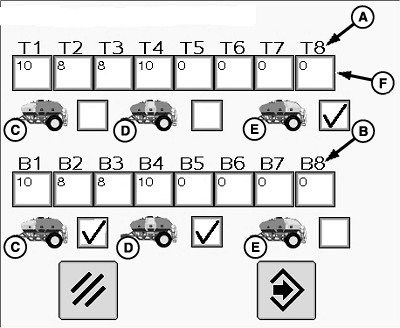
IMPORTANT: System performs best if lightest product is in front tank and heaviest product is in rear tank. NOTE: Both top and bottom primaries appear for double shoot. Only bottom primaries appear for single shoot. NOTE: On SFP tools, the top primaries feed SFP openers and bottom primaries feed seed openers. If both SFP and Dry Fert. check boxes are checked, only the top primaries are selectable. 8. Select and check the front (C), middle (D), and rear (E) tank check boxes to indicate which tanks feed top (A) and bottom (B) primaries. 9. Select Enter button. 10. The actual tool width is shown in Adj. Width box. NOTE: Width value must be entered last. When enter button is selected on Rows Per Primary screen, the Adj. Width box defaults back to factory value. The clear button does not recalculate width. If the intent is to overlap onto previous pass, select Adj. Width input box and decrease tool width by amount of intended overlap.
|
|
OUO6074,0000FD5 -19-21JUL08-2/3 |
|
|
OUO6074,0000FD5 -19-21JUL08-3/3 |