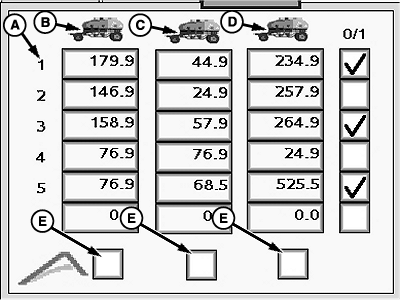
Configure Variable Rates1. Select primary Menu button >> Air Cart button >> Meters softkey >> Variable Rate tab.NOTE: Only two tanks appear for smaller carts. 2. Configure up to six rate combinations. Select the input boxes for the front, middle, and rear tanks and enter rate values. 3. To make a rate combination available on the Main RUN screen, select the check box next to a row. 4. To set a tank to operate from the Apex™ software, select the check box (E) under a tank column.
|
|



OUO6074,0000FDD -19-05JUN09-1/1 |