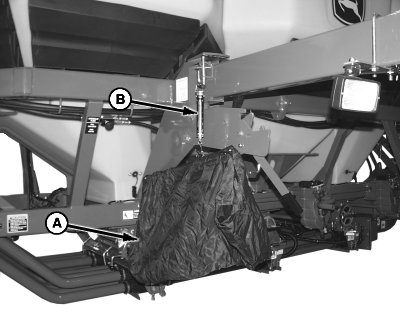
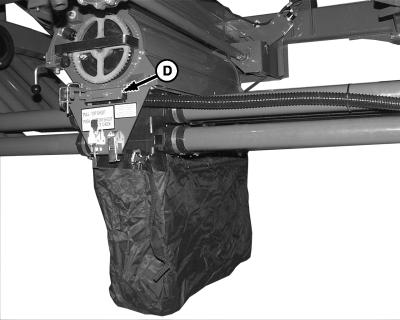
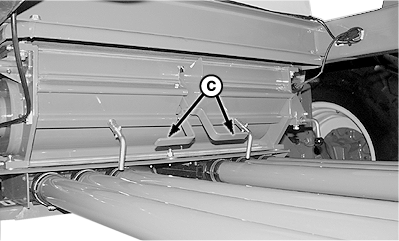
Meter Calibration1. Set up monitor, meter cartridges, and cart sprockets before calibration.NOTE: To calibrate more than one meter at a time, a separate scale must be used for each meter. Collection bags weigh different amounts and have a different zero reference on scale. 2. Choose a tank and meter to calibrate. 3. Fill tank with enough product to cover meter inlets completely throughout calibration procedure. 4. For best results, seed for 2 hectares (5 acres) before calibration to loosen product in bottom of tank. 5. Hang empty collection bag (A) from scale (B) and rotate knob on top of scale until gauge indicates zero. If more than one bag and scale are used, label bags and scales as matched sets. 6. Remove cover plate from bottom of meter and install collection bag. 7. Set transmission to 50. 8. Move half width handles (C) to fully lowered position. 9. Set slide (D) to double shoot position.
|
|
OUO6074,0000FDE -19-10JUN09-1/4 |
|
10.
Select primary
Menu
button >>
Air Cart
button >>
Meters
softkey >>
Cal
tab.
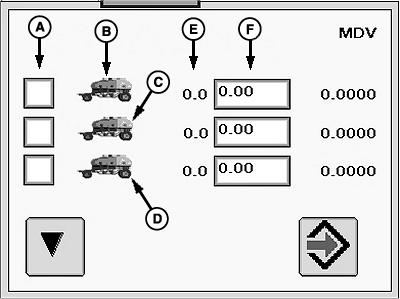
11. Select Meter Calibration (A) check box for the tank being calibrated at this time. 12. Select Calibration button.
|
|

OUO6074,0000FDE -19-10JUN09-2/4 |
|
|
|
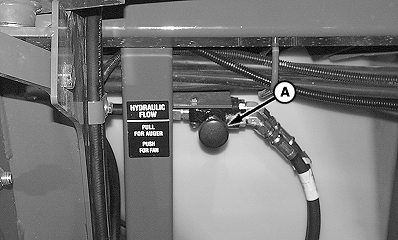
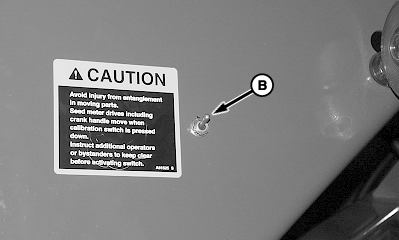
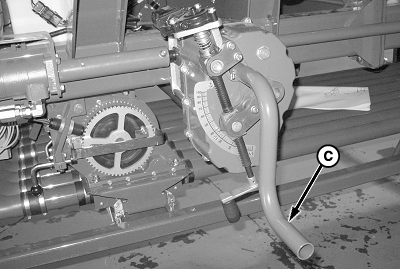
IMPORTANT: Stand clear to avoid injury. When hydraulic calibration is activated, meter components and meter handle rotate. 13. If equipped with hydraulic calibration, move diverter (A) to auger position and activate tractor hydraulics. 14. Activate calibration switch (B) or manually rotate meter handle (C) 12 rotations counterclockwise. 15. Empty product from calibration bag. Meter is now full of product and ready for calibration. 16. Reinstall calibration bag under meter and select Enter (Continue) button. 17. Activate calibration switch, manually rotate meter handle counterclockwise, or drive forward until handles stop turning. 18. Select Enter button. |
|
OUO6074,0000FDE -19-10JUN09-3/4 |
|
19.
Hang collection bag (A) on scale (B) and weigh product.
20. Select Weight input box next to the tank calibrated and enter bag weight. 21. Select Enter . The Meter Displacement Value (MDV) appears next to input box. The MDV is transferred automatically to the meter setup screen. 22. Select Setup tab. 23. Select the tank that was calibrated from the drop-down. 24. Set transmission to the Trans: value on lower area of screen. 25. Repeat procedure for other tanks calibrated. 26. Set double shoot slides, half width handles, and hydraulic diverter valve back to original positions.
|
|

OUO6074,0000FDE -19-10JUN09-4/4 |