Set Fan Speed

IMPORTANT: Do not exceed 5000 rpm maximum fan speed.

IMPORTANT: System performs best if lightest product is in front tank and heaviest product is in rear tank.

Fan rpm is dependent upon:

  • Number of primary air runs.
  • Density and size of material.
  • Meter rate.
  • Ground speed.
  • Tractor performance.
  • Air temperature.
  • Altitude.

NOTE: Excessive fan speed (rpm) damages product, increases wear on system, and blows seed out of the seed bed. Insufficient fan speed results in plugged hoses.

Fan speed is correctly set when:

  • Equal amounts of product are delivered to all openers.
  • Tubes and hoses do not plug.
  • Hoses empty quickly and evenly when meters stop.

IMPORTANT: Motor case drain hose must be connected before fan activation or motor shaft seal fails within 30 seconds.

IMPORTANT: Before setting fan speed, allow tractor hydraulic oil to warm up to operating temperature. Cold oil causes inaccurate settings.

1. Connect fan case drain hose, pressure hose, and return hose..

2. Start tractor

3. Set fan hydraulic control for low, continuous flow.

4. Activate fan hydraulics to start fan.

5. Allow hydraulic oil to warm before adjusting fan speed.

Initial Fan rpm
Single Shoot Double Shoota
Add rates of all products in air stream. Set fan according to heaviest product in air stream.
If Combined Rate Is: Set Fan rpm Between: If Heaviest Product Is: Set Fan rpm Between:
Light 6 - 56 kg/hectare (5 - 50 lb./acre) 2200 - 2800 rpm Fine Grain Like Granular Canola 2500 - 3500 rpm
Medium 56 - 112 kg/hectare (50 - 100 lb./acre) 2800 - 3500 rpm Coarse Grain 3500 - 4000 rpm
Heavy 112 - 224 kg/hectare (100 - 200 lb./acre) 3500 - 4200 rpm Light Fertilizer 56 - 112 kg/ha (50 - 100 lb./acre) 3300 - 4000 rpm
Extra Heavy 224 - 392 kg/hectare (200 - 350 lb./acre) 4200 - 4700 rpm Medium Fertilizer 112 - 224 kg/ha (100 - 200 lb./acre) 4000 - 4500 rpm
    Heavy Fertilizer 224 - 392 kg/ha (200 - 350 lb./acre) 4500 - 4700 rpm
aAdjust Double-Shoot damper to divide and balance air flow between top and bottom delivery tubes.


OUO6074,0000FDF -19-29MAY09-1/2


A59671

Air Cart Button

A59325

Primary Menu Button

A59884

Fan Button

A59883

Main Softkey


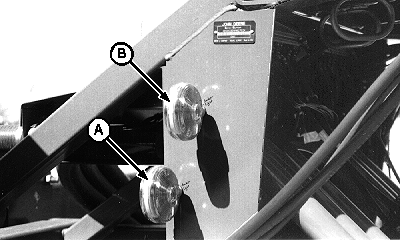
A-Low Speed Indicator
B-High Speed Indicator

6. Select primary Menu button >> Air Cart button >> Main softkey >> Fan button.

7. Select input box, enter target fan speed, and select enter.

8. Observe fan speed on bottom of screen while increasing or decreasing flow of tractor hydraulics. When fan speed reaches target speed, both indicator lights on front of cart illuminate. See Fan Speed Indicator Lights chart for additional information.

9. Observe indicator lights and screen readout while seeding. Adjust hydraulic flow to maintain target fan speed.

Fan Speed Indicator Lights on Air Cart
Fan Speed Low Bottom light illuminated. Top light dark.
Fan Speed on Target Both lights illuminated.
Fan Speed High Top light illuminated. Bottom light dark.


Screen Area Information

Air Cart Air Cart r/min Revolutions Per Minute
A40164

Fan Speed Lights

OUO6074,0000FDF -19-29MAY09-2/2