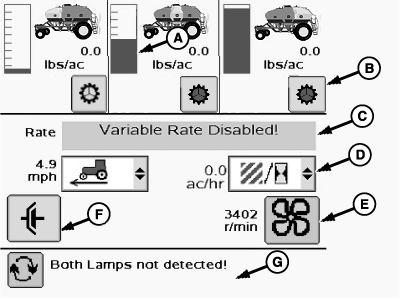
Run Screen for Fixed Rate Cart1. Select primary Menu button >> Air Cart button >> Main softkey.Front, middle, and rear tank rates and tank levels are displayed across top of screen. There are three tank level sensors inside each tank. The level indicators (A) show full, half full, and empty positions according to sensor input. All indicators shown between these three points are estimated. IMPORTANT: Avoid product overload in meter cartridge and sheared drive pins. Engage clutch only when fan is running. 2. Select individual clutch buttons (B) to control clutch at each meter. Main clutch must be active before any meter turns. 3. Select drop down boxes (D) to choose area counters, area until empty, area per hour, or ground speed. 4. Select fan speed button (E) to change target speed. 5. Select main clutch button (F) to manually control main clutch. If tool is equipped with an implement switch or height sensor, main clutch turns on and off as tool is raised and lowered. Use this button to override switch on tool. 6. Observe message area (G) for alerts. Select toggle button to see multiple messages.
|
|



OUO6074,0001083 -19-24MAR08-1/1 |