Field Method for Meter VerificationThis method simulates actual seeding and therefore is the most accurate verification. The objective is to cover a calculated area to produce an accurate product sample and verify the actual application rate. The area covered depends on the product application rate. High application rates require less area to collect a product sample. Low application rates require a large area to collect a product sample. IMPORTANT: Avoid errors. Configure all cart, tool, and tractor configurations first for accurate results. All tank meters and the speed sensor on cart tire must be calibrated. (Refer to Performance Monitor and Monitor Setup sections to complete all these requirements first.) 1. Select a target application rate.2. Properly configure meter segments. 3. Fill tank with enough product to collect a sample and maintain coverage over meter inlets. Do not pile product on one side of tank. 4. Place half-width disconnect handles fully down. 5. (Stationary Double-Shoot System Only) Move slide to bottom shoot position. 6. Set transmission to the value determined during meter calibration (value shown on bottom of meter setup screen). Manually set fixed rate transmission or seed a short distance to allow variable rate transmission to adjust. 7. Start fan and seed a short distance to fill meter with product. 8. Shut off hydraulics and place tractor transmission in park. |
OUO6074,0001084 -19-15MAR08-1/7 |
|
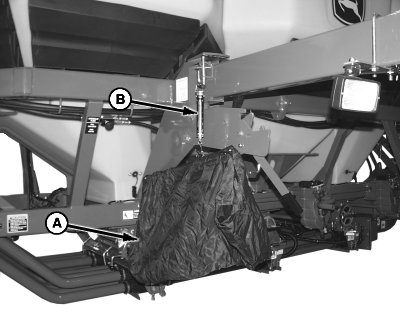
NOTE: To verify more than one meter at a time accurately, a separate scale must be used for each meter. Collection bags weigh different amounts and have a different zero reference on scale. 9. Hang empty collection bag (A) from scale (B). Turn knob on top of scale until gauge indicates zero. If more than one bag and scale are used, label bags and scales as matched sets.
|
|
OUO6074,0001084 -19-15MAR08-2/7 |
|
10.
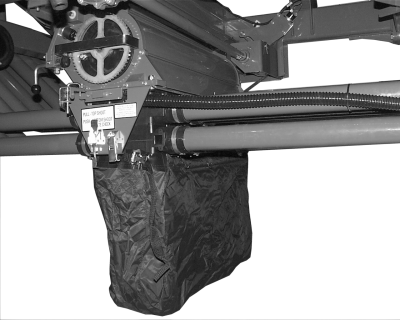
Remove cover plate from bottom of manifold.
IMPORTANT: Do not operate fan with collection bags installed. 11. Install collection bag. NOTE: The target sample weight is the expected collection amount. This amount is a customer preference. 12. Choose a target sample weight and write it down. Choose a weight close to 4.5 kg (10 lb.) if tank contains light weight product. Choose a weight close to 15.8 kg (35 lb.) if tank contains a heavy product. NOTE: The target application rate is the rate entered on meter setup screen. 13. Calculate a course length to drive for meter verification. METRIC FORMULA: Target Sample Weight (kg) x 10 000 ÷ Machine Width (m) x Target Application Rate (kg/ha) = Course Length EXAMPLE: Sorghum-(7 kg x 10 000) ÷ (13.7 m x 3.5 kg/ha) = 1460 m Course Length Wheat-(14 kg x 10 000) ÷ (13.7 m x 83.9 kg/ha) = 121.6 m Course Length IMPERIAL (U.S.) FORMULA: Target Sample Weight (lb.) x 43 560 ÷ Machine Width (ft.) x Target Application Rate (lb./acre) = Course Length EXAMPLE: Sorghum-(12 lb. x 43 560) ÷ (45 ft. x 3.1 lb./acre) = 3747 ft. Course Length |
|
OUO6074,0001084 -19-15MAR08-3/7 |
|
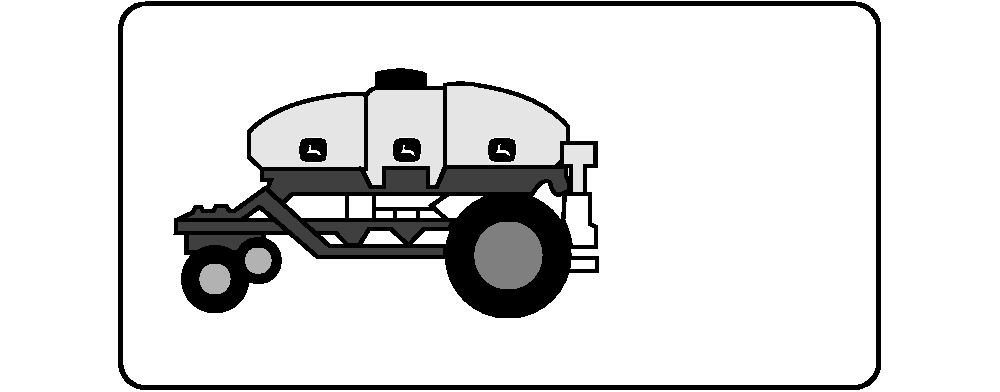
Wheat-(25 lb. x 43 560) ÷ (45 ft. x 75 lb./acre) = 322 ft. Course Length 14. Mark a section of field that equals the course length. If tractor radar has been calibrated, it is acceptable to use it to measure the course. The following conditions are needed for accurate verification:
|
OUO6074,0001084 -19-15MAR08-4/7 |
|
15.
Select primary
Menu
button >>
Air Cart
button >>
Main
softkey.
16. Turn on individual clutches for meters with collection bags installed. 17. Turn off individual clutches for meters without collection bags. 18. Turn off main clutch. IMPORTANT: Do not operate fan with collection bags installed. 19. Drive at seeding speed towards course. When front tractor tires meet start of course turn on main clutch. When front tractor tires meet end of course turn off main clutch. |
|





OUO6074,0001084 -19-15MAR08-5/7 |
|
20.
Remove the collection bag (A), hang it from scale (B), and record weight.
21. Calculate the actual delivered rate. METRIC FORMULA: Collected Sample Weight (kg) x 10 000 ÷ Machine Width (m) x Course Length (m) = Actual Rate EXAMPLE: Sorghum-(7 kg x 10 000) ÷ (13.7 m x 1460 m) = 3.5 kg/ha Actual Rate Wheat-(14 kg x 10 000) ÷ (13.7 m x 121.6 m) = 83.9 kg/ha Actual Rate IMPERIAL (U.S.) FORMULA: Collected Sample Size (lb.) x 43 560 ÷ Machine Width (ft.) x Course Length (ft.) = Actual Rate EXAMPLE: Sorghum-(12 lb. x 43 560) ÷ (45 ft. x 3747 ft.) = 3.1 lb./acre Actual Rate Wheat-(25 lb. x 43 560) ÷ (45 ft. x 322 ft.) = 75 lb./acre Actual Rate 22. If actual rate equals target rate, return half-width disconnect handles and double shoot slide to original positions. Activate all clutches. If actual rate does not equal target application rate, perform the following: NOTE: See your John Deere dealer for assistance, if needed.
|
|
OUO6074,0001084 -19-15MAR08-6/7 |
|
|
OUO6074,0001084 -19-15MAR08-7/7 |