Enter Row Spacing
NOTE: Display shows a 30 in. row spacing example.
-
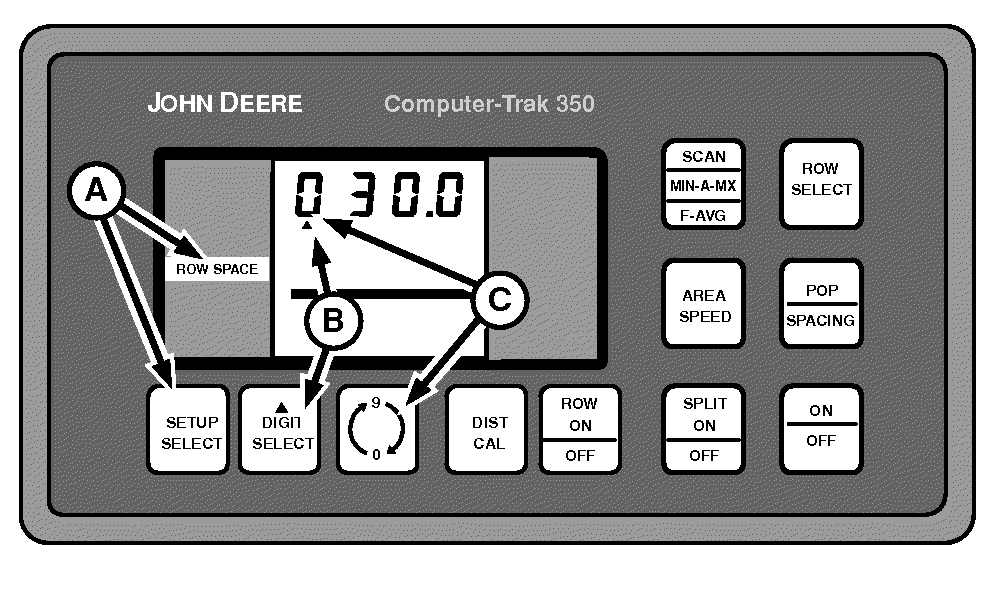
A49591-UN-26JUL02A - SETUP SELECT Switch
B - DIGIT SELECT Switch
C - 0-9 Switch
Press SETUP SELECT switch (A) until ROW SPACE is displayed in left-hand column. -
Press DIGIT SELECT (B) until triangle is under number to be changed.
-
NOTE: If row spacing is less than one or greater than 250, the monitor is forced into a FORCED SETUP STATE. The monitor cannot acknowledge other selections until set to a proper row spacing.
Touch 0-9 switch (C) until desired number is shown.
Changing the row spacing automatically recalculates IMPLEMENT WIDTH.
|
OUO6045,00000B4-19-20090310 |