Enter Number of Rows
NOTE:
A49592-UN-26JUL02
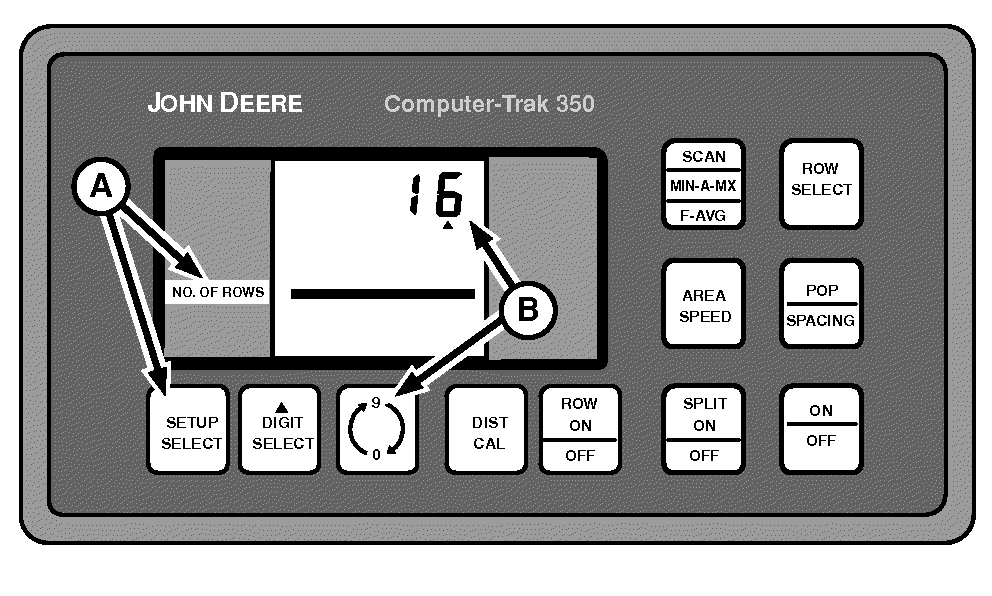
A - SETUP SELECT Switch
B - 0-9 Switch
The display shows 16 rows as an example.-
Press SETUP SELECT switch (A) until NO. OF ROWS (number of rows) is displayed in left-hand column.
-
NOTE: Changing the number of rows automatically turns on all rows turned off in the row ON-OFF procedure.
NOTE: No digit selection is required for row number selection.
Press 0-9 switch (B) until the total number of rows is displayed.
Changing the number of rows automatically recalculates IMPL WIDTH (implement width).
|
OUO6045,00000B5-19-20150716 |