Use of PA (Population Adjust)
A49806-UN-08AUG02
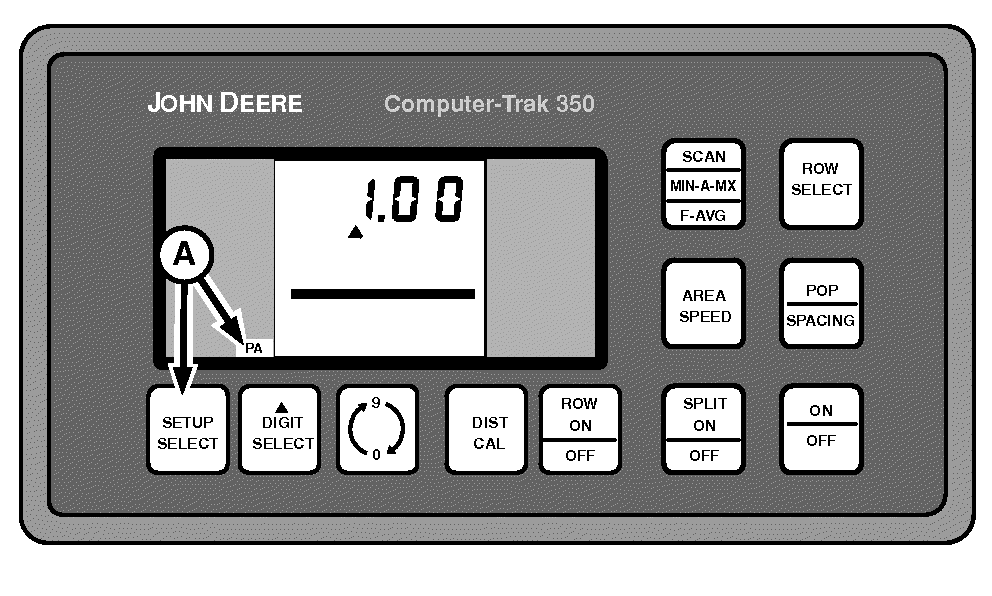
A - SETUP SELECT Switch
The PA (POPULATION ADJUST) feature is best used with high delivery rates or small seeds when the sensors are not able to count every seed.PA (POPULATION ADJUST) This number represents a “correction factor” by which Population readings are multiplied, before being displayed. A “PA” number of 1.00 causes no change in the population readings. A “PA” number of 2.00 causes population numbers to double before being displayed.
NOTE: The minimum number allowed is 0.5 and the maximum number allowed is 2.50. Any number less than 0.5 or greater than 2.50 does not allow the SETUP function to be exited until a number within this range is entered.
Press SETUP SELECT switch (A) until PA is displayed in left-hand column.
Use DIGIT SELECT and 0-9 switches to enter values.
Example:
If 100 000 seeds/acre is displayed on monitor but 150 000 are actually being planted, a PA value of 1.5 must be entered. The monitor then multiplies each seed detected by 1.5 and increase the accuracy displayed.
|
OUO6045,00000BC-19-20090206 |