6000 Series Tractors—Console Installation
-
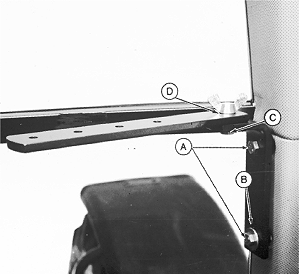
A35324-UN-03DEC92A - M10 x 20 mm Cap Screw (2 used)
B - Washer
C - M10 x 30 mm Cap Screw
D - M10 Wing Nut
Position mounting bracket on corner post as shown, install one M10 x 20 mm cap screw (A) in top hole of bracket. Install second M10 x 20 mm cap screw (A) with washer (B) in bottom slotted hole of bracket. -
Fully thread M10 x 30 mm cap screw (C) into bracket as shown. Position monitor mounting strap over threaded end of cap screw. Secure strap to cap screw using M10 wing nut (D).
-
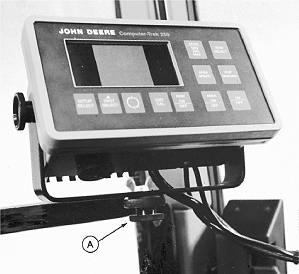
A35325-UN-03DEC92A - Knob
Mount monitor console to monitor strap with threaded knob (A). -
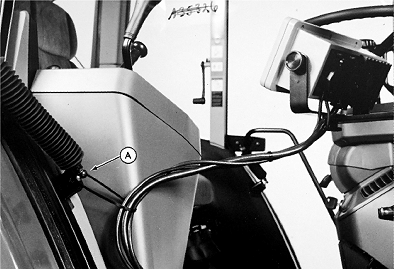
A35409-UN-09DEC922.7 m (9 ft) Harness Illustrated
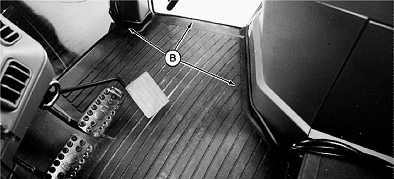
A35410-UN-09DEC924.6 m (15 ft) Harness Illustrated
A - Door Cylinder Anchor
B - Harness Routing
(Monitors With 2.7 m (9 ft) Harness) Tie harness to door cylinder anchor (A) and route along right-hand side of console. -
(Monitors With 4.6 m (15 ft) Harness) Route harness under floor mat along right-hand side of console in area (B).
-
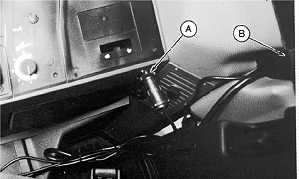
A35328-UN-03DEC92A - Rear Convenience Outlet
B - Grommet
Connect power harness to rear convenience outlet (A). -
Route main harness and radar harness through grommet (B) at rear of cab.
-
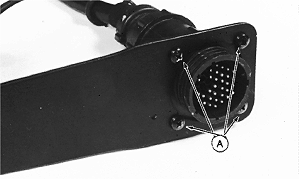
A35329-UN-03DEC92A - Self-tapping Screw (4 used)
Install mounting spade to monitor harness using self-tapping screws (A). -
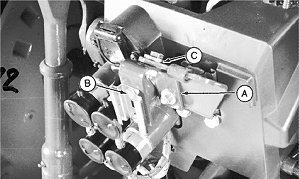
A35330-UN-03DEC92A - Mounting Bracket
B - Spade Socket
C - Tractor Bracket
Install mounting bracket (A) to tractor bracket as shown. -
Install spade socket (B) as shown.
-
Use large washer over large hole in tractor bracket (C).
-
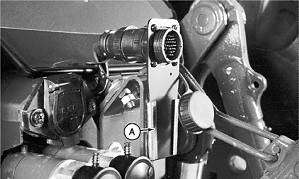
A35331-UN-03DEC92A - Socket
Install spade into spade socket (A). -
Coil and tie band excess harness behind cab.
-
Connect radar harness. Keep radar connector outside of cab for easy monitor removal.
|
OUO6045,00000DF-19-20150716 |