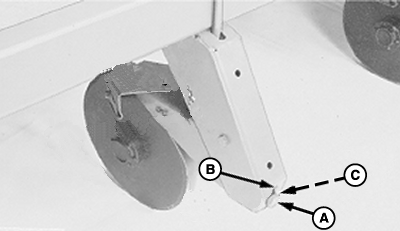
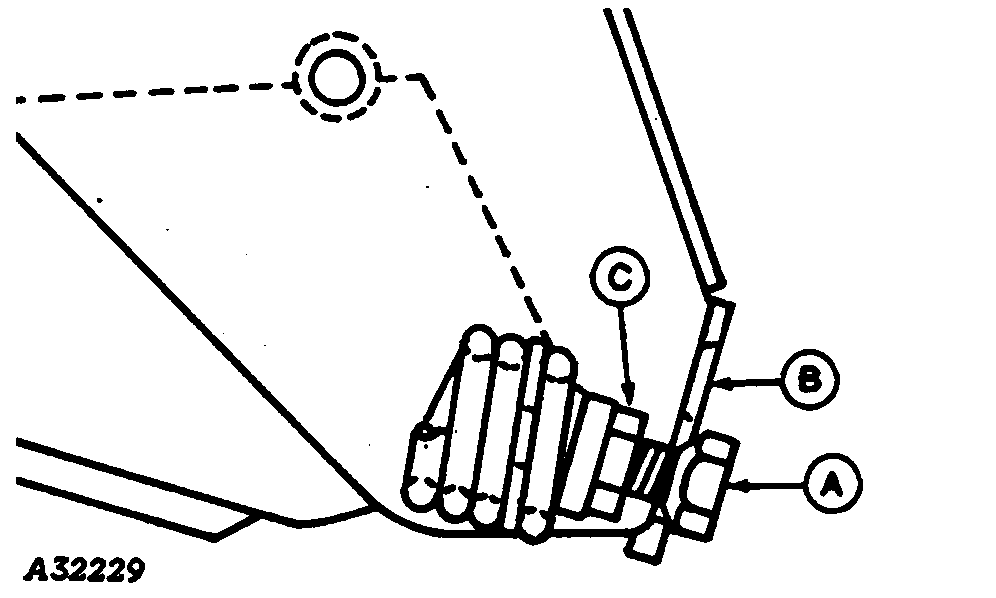
Adjusting Frame Mounted Double-Disk Fertilizer OpenersDouble-disk openers will perform in conventional and reduced tillage conditions. They are not recommended for no-till or double crop field conditions where the double disk design limits penetration ability. IMPORTANT: On certain frame configurations, some opener locations may be limited. The openers will place fertilizer approximately 50 mm (2 in.) off row center and 76 mm to 125 mm (3 in. to 5 in.) deep, depending on soil conditions. The disks are equipped with self-lubricating anti-friction bearings. The double-disk opener can be adjusted for light or heavy soil conditions. For light soils, place the spring anchor bolt (A) at top of slot (B) and for heavy soils, place the spring anchor bolt at bottom of slot. IMPORTANT: The adjusting bolt jam nut must NEVER bottom against the housing. Bottoming this nut against the housing restricts the pivoting action of the bolt, resulting in premature spring and/or bolt failures. To change spring position proceed as follows: 1. Raise machine.2. Loosen jam nut (C). 3. Turn spring anchor bolt (A) until spring is loose. 4. Move anchor bolt to desired position. 5. Tighten anchor bolt and jam nut. |
|
AG,OUO6074,1337 -19-22MAR04-1/3 |
|
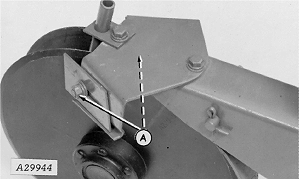
Adjust scrapers with cap screws (A) until scraper is close but not touching the disk blade. The opener can be locked in a raised position when the fertilizer attachment is not being used or for storage. To lock opener in a raised position, proceed as follows: 1. Raise machine and place blocks beneath the openers. Remove stop pin.
|
|
AG,OUO6074,1337 -19-22MAR04-2/3 |
|
2.
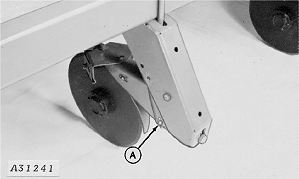
Lower machine carefully with openers resting on blocks and install stop pin in locking hole (A), which is normally hidden by the mounting bracket.
|
|
AG,OUO6074,1337 -19-22MAR04-3/3 |