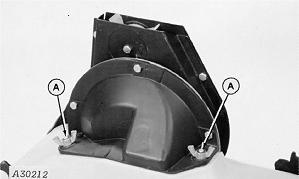
Finger Pick-Up MechanismNOTE: This should be done every 100 hours or every season, whichever comes first. 1. Remove seed hopper from machine. 2. With seed hopper upside down, remove wing nuts (A) that connect finger pick-up mechanism to bottom of seed hopper and pull mechanism straight up to remove it from two mounting studs and retainer ring.
|
|
AG,OUO6074,1382 -19-04AUG00-1/9 |
|
3.
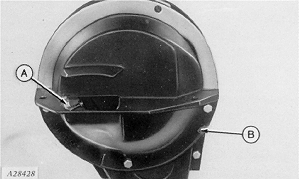
Remove three screws and baffle (B) from front of finger pick-up assembly (A) to provide access to fingers.
|
|
AG,OUO6074,1382 -19-04AUG00-2/9 |
|
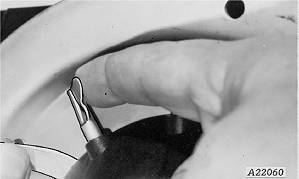
IMPORTANT: Never turn finger pick-up mechanism backward. Damage to brush will result. IMPORTANT: Check tightness of adjusting nut periodically. Failure to maintain proper finger assembly adjustment will result in a loose finger assembly which will tend to overpopulate, especially with small seed-corn sizes. 4. Turn finger pick-up by hand to see if springs are holding tabs of fingers in contact with carrier plate in appropriate area (A) and if cam is raising fingers properly in remaining area (B). There should be less than 0.15 mm (0.006 in.) gap between finger holder and carrier with light tension on a finger tab adjacent to area being measured. Raise finger tab until contact is felt, then use a feeler-gauge to check gap between finger holder and carrier. 5. If there is an excessive build up of seed treatment material or chaff beneath finger holder, the gap between finger holder and carrier is too large or fingers need replaced, disassemble and clean or repair mechanism as follows:
|
|

AG,OUO6074,1382 -19-04AUG00-3/9 |
|
6.
Remove cotter pin (A), nut lock (B) and adjusting nut from shaft.
7. Carefully lift finger pick-up assembly off shaft and clean.
|
|

AG,OUO6074,1382 -19-04AUG00-4/9 |
|
8.
To replace fingers (A) or springs (B), remove springs from finger and remove finger from carrier. When replacing fingers, install springs with open end of spring loop toward inside of finger holder.
|
|

AG,OUO6074,1382 -19-04AUG00-5/9 |
|
9.
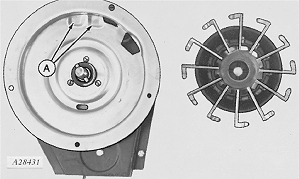
Before installing finger pick-up assembly on carrier, check dimples (A) on carrier plate for wear.
Carrier plate is made of case-hardened steel with a hard chrome plated wear surface. Excessive wear of carrier plate at dimples will result in over population, especially with small seed corn sizes. Inspect carrier plates yearly. Replace carrier plates when hard chrome surface has worn away and case-hardened steel begins to wear. This will be identifiable by a change in shape of dimples (A).
|
|
AG,OUO6074,1382 -19-04AUG00-6/9 |
|
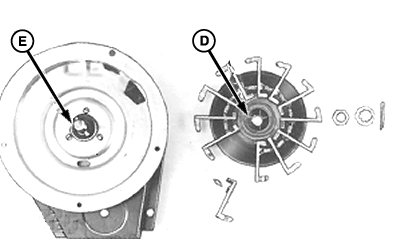
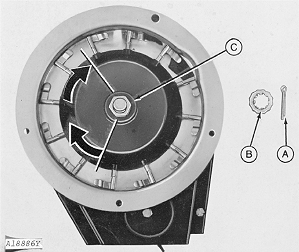
IMPORTANT: Never turn finger pick-up mechanism backward. Damage to brush will result. NOTE: Finger should seat in holder so holder is flush with carrier plate when assembled. Align notch in bearing (E) with projection on cam (D). NOTE: Finger pickup finger tension can be adjusted for specific seed sizes and shapes. Seed size and shape in addition to meter rpm can affect meter performance. Your John Deere dealer can set your meter for your seed and meter speed. See your John Deere dealer for more information. 10. Install finger pick-up assembly and adjusting nut (C) on shaft. 11. With finger holder firmly seated against carrier plate, turn nut clockwise by hand until it contacts finger holder and a slight resistance is felt. 12. Continue to turn nut two flats clockwise (one third turn) until finger holder is properly positioned against carrier. 13. Turn finger holder by hand to ensure mechanism is not over tightened. Finger holder must be adjusted firmly against carrier but still turn by hand with moderate force. 14. Maintain adjustment with nut lock (B) and cotter pin (A). |
|
AG,OUO6074,1382 -19-04AUG00-7/9 |
|
IMPORTANT: Check tightness of adjusting nut periodically. Failure to maintain proper finger assembly adjustment will result in a loose finger assembly which will tend to over populate, especially with small seed-corn sizes. 15. As a check on the above adjustment, there should be less than 0.15 mm (0.006 in.) gap between finger holder and carrier with light tension on a finger tab adjacent to area being measured. Raise finger tab until contact is felt, then use a feeler-gauge to check gap between finger holder and carrier. |
|
AG,OUO6074,1382 -19-04AUG00-8/9 |
|
16.
The meter brush (A) helps dislodge multiple seeds held under individual fingers. If brush wear becomes excessive, individual fingers can meter multiple seeds resulting in over population.
Brush length should cover at least one-half the tab on pick-up finger. Since brush is being constantly used during operation, replacement is recommended every 100 hours.
|
|

AG,OUO6074,1382 -19-04AUG00-9/9 |