Clean Insecticide and Herbicide Hoppers
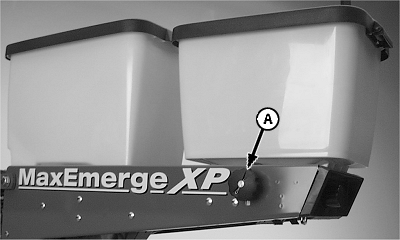
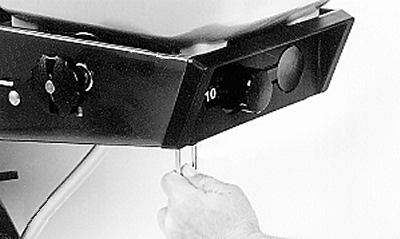
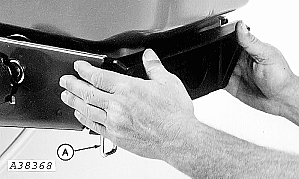
IMPORTANT: Under certain humidity or moisture conditions, material can tend to cake. Thoroughly clean hoppers at end of each days use. NOTE: The chemical meter fluted roller wears during operation. To maintain meter accuracy, the fluted roller should be replaced every 250 hours of use or beginning of planting season. 1. Pull out and turn drive disconnect knob (A) to disconnect drive. 2. Pull down and rotate inner end of pin toward rear of planting unit.
|
|
 CAUTION:
Agricultural chemicals can be dangerous. Follow instructions of chemical manufacturer when cleaning hoppers and handling insecticides or herbicides.
CAUTION:
Agricultural chemicals can be dangerous. Follow instructions of chemical manufacturer when cleaning hoppers and handling insecticides or herbicides.
OUO6074,00009E4CONV1 -19-23JUN09-1/5 |
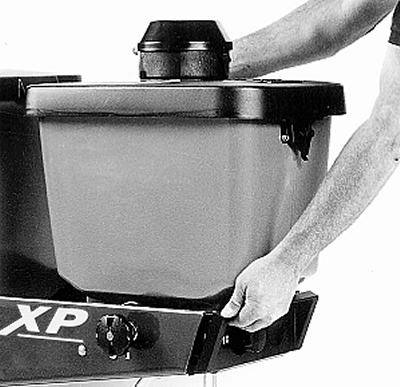
| 3. Pull straight back and up until front hopper support hits back of slot in support rail. Then, lift up to disengage hopper from panels. |
|
OUO6074,00009E4CONV1 -19-23JUN09-2/5 |
|
4.
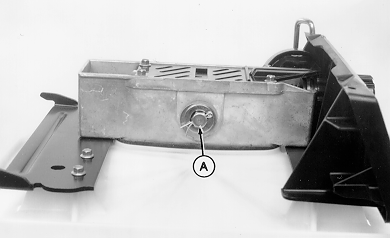
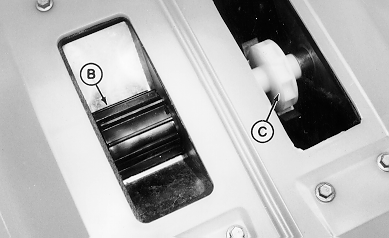
Remove cotter pin and shaft (A) (two on double meter assembly). Remove fluted roller (B) and or high-rate roller (C). Remove meters from hopper. Thoroughly clean hopper outlet openings and rollers. Lubricate meter drive assembly between coupler, washers, and outer bearing with John Deere Multipurpose Spray Lubricant.
|
|
OUO6074,00009E4CONV1 -19-23JUN09-3/5 |
| 5. Slide hopper forward on rail until front support hooks drop into slots and rear support is firmly seated. |
|
OUO6074,00009E4CONV1 -19-23JUN09-4/5 |
|
6.
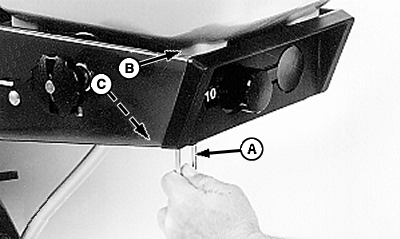
Push hopper forward until it stops. Rotate spring pins (A) inward slightly until pin "snaps" into place and locks hopper to unit at (B).
Do NOT attempt to install pin in support panel hole (C).
|
|
OUO6074,00009E4CONV1 -19-23JUN09-5/5 |