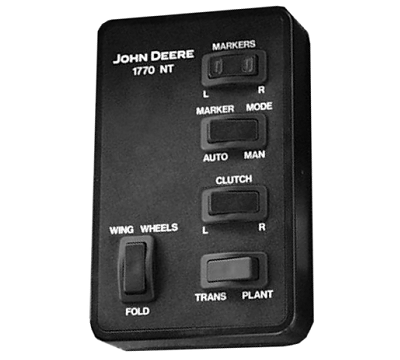
Raise and Lower 12 and 16 Row Markers Connected to Lift CircuitNOTE: If machine is equipped with drawbar hitch, the drawbar hitch control switch must be in the "Marker" position for markers to operate. NOTE: If the AUTO-MAN switch is in the "Neutral" position (middle), the markers will not operate. AUTOMATIC ALTERNATION: 1. Place TRANS-PLANT mode switch in "Plant" position.2. Place AUTO-MAN marker mode switch in "Auto" position. 3. Activate frame lift SCV. The frame must be completely raised to activate marker alternating switch. NOTE: Green light in the MARKERS switch indicates which marker will lower in Auto mode. 4. Activate frame lower SCV. Opposite marker will automatically lower. MANUAL ALTERNATION: NOTE: The MARKERS switch has two lights in it. The indicator light shows which marker will function. 1. Place TRANS-PLANT mode switch in "Plant" position. 2. Place AUTO-MAN marker mode switch in "Man" position. 3. Place MARKERS switch in "L" position to control left marker or "R" position to control right marker. 4. Activate frame SCV to raise and lower designated marker. Markers will not automatically alternate in this mode. Right and left marker must be manually selected. LIFT OVER A FIELD OBSTRUCTION: |
|
OUO6435,0001F13 -19-22MAY09-1/2 |
|
1.
Place TRANS-PLANT mode switch in "Trans" position. This allows the marker to raise and frame to remain in plant position.
2. Place AUTO-MAN marker mode switch in "Man" position. 3. Move frame SCV back to raise marker and avoid obstruction. 4. Select marker with MARKERS switch "R" (right) or "L" (left) . 5. Move frame SCV forward to lower marker again. 6. Return AUTO-MAN marker mode switch to desired selection. 7. Return TRANS-PLANT mode switch to "Plant" position. LOWER BOTH MARKERS: 1. Place TRANS-PLANT mode switch in "Plant" position.2. Place AUTO-MAN marker mode switch in "Man" position. 3. Select a marker with MARKERS switch "R" (right) or "L" (left) . 4. Lower marker. 5. Select other marker with MARKERS switch "R" (right) or "L" (left) . 6. Lower other marker. 7. Place AUTO-MAN marker mode switch to desired selection. Both markers will raise when SCV is activated to raise markers. |
OUO6435,0001F13 -19-22MAY09-2/2 |