Replace Double Disk Fertilizer Opener Bearing
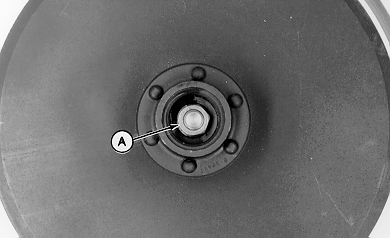
A44323-UN-05DEC97A - Nut
Support machine safely. (See procedure at the beginning of this section.)Remove dust cap and nut (A).
Remove disk.
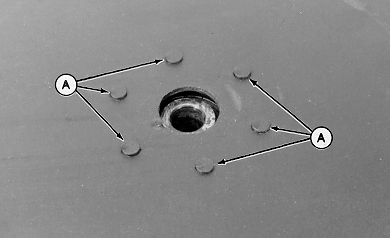
A44324-UN-05DEC97A - Rivet (6 used)
Grind off rivets (A).Drive rivets out and remove spacer and bearing housing from blade.
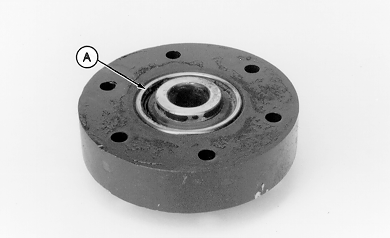
A44325-UN-05DEC97A - Bearing
Press bearing (A) from housing.Inspect housing, spacer, and disk blade. Replace parts as needed.
IMPORTANT: Press only on outer race of bearing.
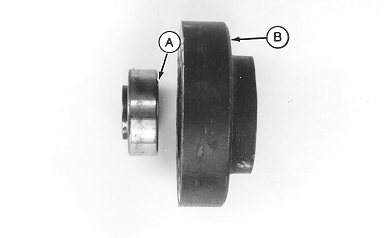
A44326-UN-05DEC97A - Bearing
B - Housing
Install bearing in housing with flat surface (A) facing housing (B).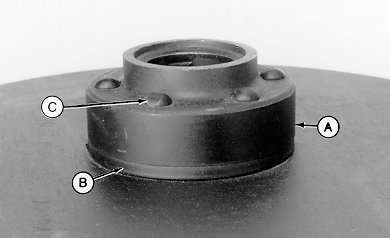
A44327-UN-05DEC97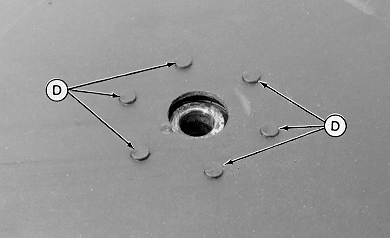
A44328-UN-05DEC97A - Housing
B - Spacer
C - Rivet (6 used)
D - Rounded End of Rivet
Install housing (A) and spacer (B) on disk, while aligning rivet holes.Install rivets (C).
Strike the end of rivets (D) with a hammer until rounded over to secure hub and spacer to disk.
NOTE: See DISK ADJUSTMENT in this section, before installing disk on machine.
Install disk on machine. (See INSPECT AND ADJUST OPENER BLADES in this section.)
Remove support components.
OUO6045,0000A22-19-20090526 |