Remove Pro-Series™ XP Seed Meter Assembly From Row Unit

A62348-UN-27MAR08Unlocked Symbol Up
A49955-UN-03DEC02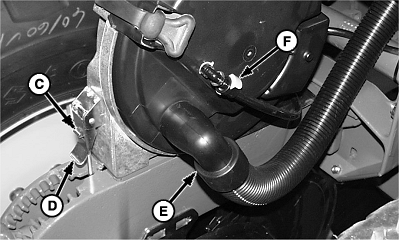
A53366-UN-20NOV03
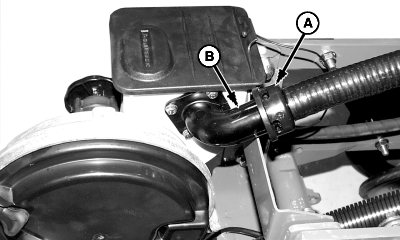
A53367-UN-20NOV03A - Delivery Hose
B - Fill Neck
C - Clip
D - Latch
E - Vacuum Hose
F - Clip
G - Lock Pin
H - Drive Cable
I - Gearbox Housing
Rotate CCS seed delivery hose (A) counterclockwise until it unsnaps from hopper fill neck (B) and pull off hose.Rotate lock pin (G) 180 degrees until the “unlocked” symbol is on top.
Remove vacuum hose (E).
If row is monitored for vacuum pressure, pull clip (F) sideways to unlock and pull sensor hose off fitting.
Push down on clip (C) while lifting up on latch (D) to unlock meter assembly from row unit.
Pull Pro-Shaft Drive cable (H) from gearbox housing (I) while raising rear of meter upward and rearward.
OUO6074,000088B-19-20090515 |