Adjust John Blue™ Fixed Rate Pump Setting Number
NOTE: If equipped with Variable Rate Fertilizer, see your SeedStar™ 2 Monitor Operator’s Manual.
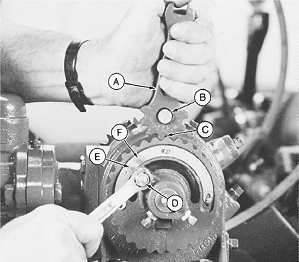
A35432-UN-21DEC92A - Adjustment Tool
B - Pin
C - Scale Ring
D - Nut
E - Pointer
F - Gauge
Use rate chart to determine PUMP SETTING number for desired application rate.Install adjustment tool (A) on pump pin (B) aligning teeth with scale ring (C).
Loosen nut (D) and rotate scale ring until pointer (E) is aligned with pump setting number on gauge (F). Tighten nut to specification.
Item Measurement Specification Nut Torque 25 N·m (18 lb-ft) 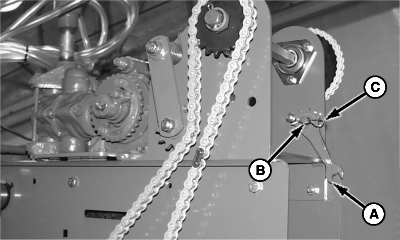
A47955-UN-12SEP01A - Adjustment Tool
B - Pin
C - Clip Pin
Store adjustment tool (A) on pin (B) located on pump mounting bracket. Attach tool with clip pin (C).
OUO6074,0000E74-19-20090522 |