Additional Quick Reference Setup for Setup for Seedstar™ XP
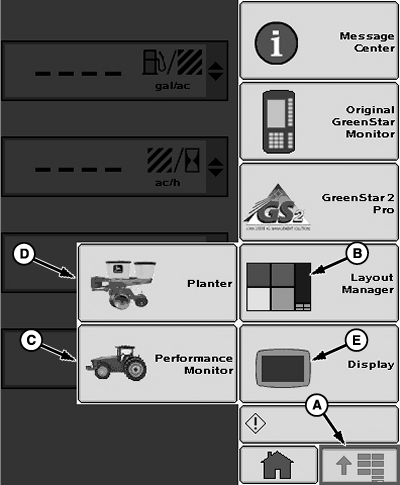
A61139-UN-12OCT07
Main Menu Screen
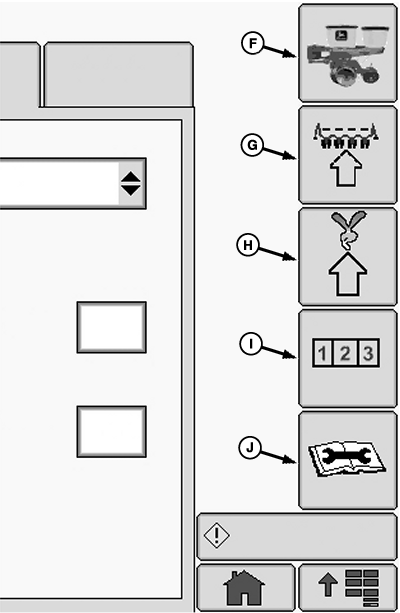
A61140-UN-15OCT07
Planter Application Screen
A - Main Menu
B - Layout Manager
C - Performance Monitor
D - Planter Application
E - Display Application
F - Planter Main
G - Planter Configuration
H - Planter Rates
I - Planter Totals
J - Planter Diagnostics
The following reference assumes that the operator has read and understands this manual. Some button images are given on this page as a reminder. Some entries require certain information be set up first. Follow quick reference in sequence.Quick Reference | |||
|---|---|---|---|
Planter Sensor Configuration | >> Sensor Tab | ||
>> Down Force | >> Sensors: Drop Down | Select number of down force sensors on machine. | |
>> Target Margin Input Box | Enter target down force margin. | ||
>> Sensor Drop Down | Select sensor. | ||
>> Row Drop Down | Select row. | ||
>> Check Box | Enable or disable sensor. | ||
>>Calibration Value Input Box | Enter calibration value for each gauge wheel down force sensor. John Deere™ sensors are 1394. | ||
>> Ride Quality | >> Sensors: Drop Down | Select number of ride quality sensors on machine. | |
>> Sensor Drop Down | Select sensor. | ||
>> Row Drop Down | Select row. | ||
>> Check Box | Enable or disable sensor. | ||
PDF Air Pressure | >> Step Value Input Box | Sets up the step by which the system increments or decrements the target PDF value when the up and down arrows are pressed. | |
>> PDF Low Alarm Input Box | Enter low pneumatic down force alarm set point. | ||
>>Calibration Value Input Box | Configures the value used by the air pressure sensor to determine actual air pressure value. John Deere™ sensor calibration value is 494. | ||
Diagnostics | |||
>> Diagnostic Softkey >> Readings tab | >> Sensors/Status | Observe readings of programmed sensors. | |
>> System Voltages | Provides system data. | ||
Down Force | Displays down force sensor pressure and voltage. | ||
Ride Quality | Displays ride quality sensor percentages. | ||
Planter at a Glance — User Settings | >> Select and hold the Screen Scan button for 4 seconds. | ||
Alarms and Limits Setup Page | >> Select and hold any of the SeedStar™ XP buttons for 4 seconds. | ||
OUO6064,0000012-19-20100721 |