Planter Details

A59325-UN-19FEB07
Menu
A59551-UN-08MAR07
Planter Button
A67003-UN-30APR10
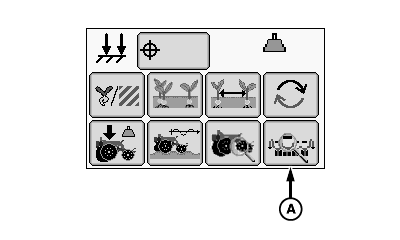
A - Planter Details Page Button
Select Menu >> Planter button.
When planter details page button (A) is selected the planters detail page is displayed.
A67800-UN-02JUL10
Planter Detail Page
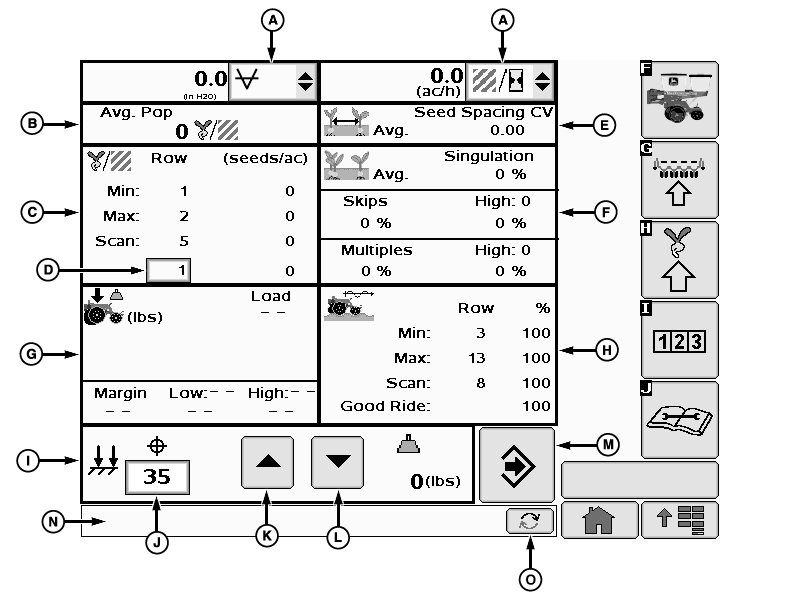
A - List Boxes
B - Average Population
C - Seed Population
D - Row Selection Input Box
E - Seed Spacing Coefficient of Variation
F - Seed Singulation
G - Down Force
H - Ride Dynamics
I - Pneumatic Down Force Adjust
J - Pneumatic Down Force Target Input Box
K - Step Increase Button
L - Step Decrease Button
M - Return Button
N - Caution Area
O - Toggle Button
When planting, the planter details screen displays active planting information. Screens do not update while machine is stopped. Once machine begins moving, the screen resumes updating.Planter Details page includes the following:
(A) List Boxes display the following information and options:
- Field area 0
- Field area 1
- Field area 2
- Area per hour
- Vacuum sensor readings
- Tractor speed
(B) Average Population displays the following information:
- Average population
(C) Seed Population displays the following information and options:
- Minimum row population
- Maximum row population
- Scan row population
- Row Selection Input Box
Row selection input box (D) allows operator to select an individual row to monitor population.
(E) Seed Spacing Coefficient of Variation (CV) displays the following information:
- Average Coefficient of Variation value for the whole planter.
(F) This area displays the following Seed Singulation percentages:
- Total singulation
- Total skips
- Row with highest skips
- Total multiples
- Row with highest multiples
(G) Down Force displays the following information:
- Percent of ground contact
- Average down force load
- Total margin
- Low row margin
- High row margin
(H) This area displays the following Ride Dynamics percentages:
- Minimum row good ride
- Maximum row good ride
- Scan row good ride
- Total planter good ride
(I) Pneumatic Down Force Adjust displays the following information and options:
- Pneumatic down force target input box
- Step increase button
- Step decrease button
- Actual pneumatic down force output field
Pneumatic down force target input box (J) allows the operator to input a specific target pressure for the system to monitor.
(K) Step increase button raises down force pressure by the amount setup in the step values input box. See INTEGRATED PNEUMATIC DOWN FORCE AIR PRESSURE SENSOR in the SeedStar™ 2 SETUP Basic Planter Configuration section.
(L) Step decrease button lowers down force pressure by the amount setup in the step values input box. See INTEGRATED PNEUMATIC DOWN FORCE AIR PRESSURE SENSOR in the SeedStar™ 2 SETUP Basic Planter Configuration section.
(M) Return button returns operator to main planter screen.
(N) Caution Area displays warning and error messages.
(O) Toggle button scans all warning and error messages.
Screen Area Information
Avg. Pop - Average Population
Row - Row
Min: - Minimum
Max: - Maximum
Scan: - Scan
Avg. - Average
Skips - Skips
High: - High
Multiples - Multiples
Load - Load
Margin - Margin
Low: - Low
High: - High
Good Ride: - Good Ride
OUO6064,0000192-19-20100630 |