Down Force

A59325-UN-19FEB07
Menu
A59551-UN-08MAR07
Planter Button
A67119-UN-12MAY10
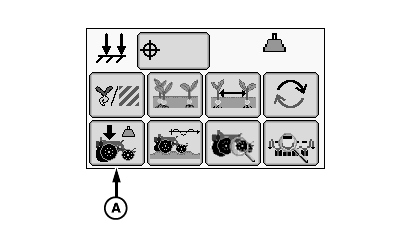
Down Force Button
A - Down Force Button
Select Menu >> Planter button.
When down force button (A) is selected, the down force at a glance screen is displayed.
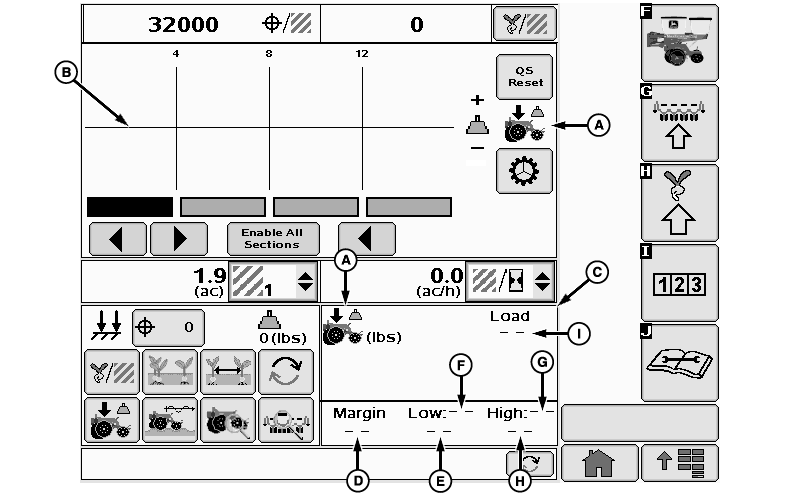
The Down Force run screen displays average gauge wheel load for the whole planter and down force margin information for each row unit equipped with a sensor node controller and gauge wheel down force sensor.
The gauge wheel down force sensor measures the amount of load that the gauge wheels are carrying as the row units move through the field. The load on the gauge wheels is changing constantly when the planter is in motion.
Down force margin is the amount of extra down force being applied to the row unit, over and above what is required for the opener disks to penetrate the soil and achieve full planting depth. The extra down force can come from the weight of the row unit and meter, weight of seed in the seed hoppers, the pneumatic down force system, or external down force springs.
A target down force margin must be entered based on the operator’s judgment of planting conditions. Refer to DOWN FORCE SENSOR AND TARGET MARGIN CONFIGURATION in SeedStar™ XP SETUP Enhanced Monitor System section. Down force margin should be set high enough to create a defined seed furrow but not so high that the side wall of the furrow is compacted.
Margin alarm set point is defined on the Alarms and Limits Setup Page. The margin alarm will activate if the planter average down force margin goes above or below the target margin by the amount entered on the Alarms and Limits Setup Page.
The center line of the Down Force at a Glance chart is the target margin. Down Force at a Glance bars above the center line indicate down force margin above the target set point. Bars below the center line indicate down force margin below the target set point. If down force margin is consistently low on monitor screen, increase pneumatic row unit down force setting or reduce target margin set point based on your judgment of planting conditions and uniformity of seed depth. If down force margin is consistently high on monitor screen, decrease pneumatic row unit down force setting or increase target margin set point.
A67886-UN-20JUL10
A - Down Force Icon
B - Margin Graph
C - Down Force Details Screen
D - Down Force Margin
E - Low Margin Value
F - Low Margin Target
G - High Margin Target
H - High Margin Value
I - Planter Average Gauge Wheel Load
(A) Down force icon
(B) Margin bar graph
(C) Down force details screen contains the information of the current bar graph.
(D) Planter Average Down Force Margin
(E) Low Margin Value for row unit with lowest down force margin.
(F) Row number of the row unit with lowest down force margin.
(G) Row number of the row unit with highest down force margin.
(H) High Margin Value for the row unit with highest down force margin.
(I) Planter Average Gauge Wheel Load
Screen Area Information
QS Reset - QS Reset
Enable All Sections - Enable All Sections
OUO6064,0000195-19-20100729 |