Seed Population

A59325-UN-19FEB07
Menu

A59551-UN-08MAR07
Planter Button
A67120-UN-12MAY10
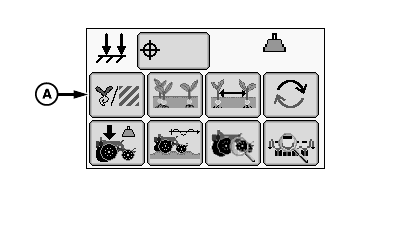
Seed Population Button
A - Seed Population Button
Select Menu >> Planter button.
When seed population button (A) is selected the seed population run screen is displayed.
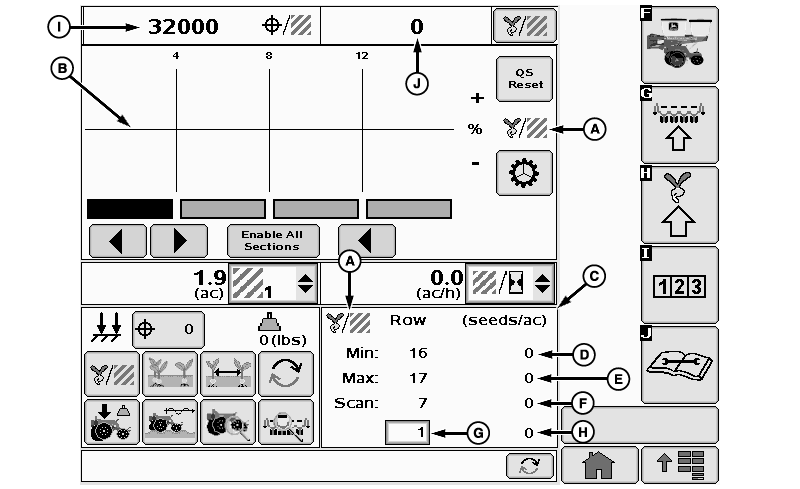
The Seed Population main run screen displays seeding rate information for the planter. The Planter Main 1 (PM1) controller receives data from the seed sensors and uses tractor speed and implement width to calculate the seed rate.
Population at a Glance bar graph:
The line in the middle is the target population. When a row approaches the upper or lower alarm limit, the bar for that row tuns orange and an audible alarm sounds along with a text message.
If a row falls below two seeds per second, the bar turns red and a row failed warning appears. The top of the graph is the programmed upper alarm limit. The bottom of the graph is the programmed lower alarm limit. Refer to SETUP Seed Rates section.
A67887-UN-14JUL10
A - Seed Population Icon
B - Percent High and Low Graph
C - Seed Population Details Screen
D - Minimum Row Population
E - Maximum Row Population
F - Scan Row Population
G - Row Entry Box
H - Average Population
I - Target Population
J - Average Population
Seed Population at a Glance Screen
(A) Population icon
(B) Population At a Glance bar
(C) Seed population details screen contains the information of the current bar graph.
(D) Minimum row population
(E) Maximum row population.
(F) Scan row population.
(G) User entered row number.
(H) User entered row population
(I) Target population
(J) Average population
Screen Area Information
QS Reset - QS Reset
Enable All Sections - Enable All Sections
Row - Row
OUO6064,0000196-19-20100720 |