Assign Motor—Rows, Sprockets, and Width Disconnect
IMPORTANT: Complete frame configuration first for correct VRD configuration.

A59325-UN-19FEB07Menu
A59551-UN-08MAR07Planter Button
A62918-UN-23JUL08Configure Softkey
A62919-UN-23JUL08Settings Button
A62277-UN-23JUL08Next Page

A59520-UN-23JUL08Disconnect
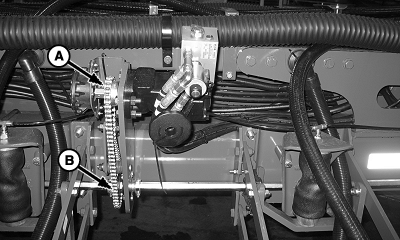
A59899-UN-02APR07A - Drive Gear
B - Driven Gear
Select Menu >> Planter button >> Configure softkey >> Drives tab.Highlight drop down box and select Drive Sections
Select Settings button and set the number of motors on machine.
Select Next Page button. Set up each motor, one at a time, entering the following:
NOTE: Row number one is always on left side of machine in direction of travel.
- Select End Row input box and enter right most row number controlled by selected VRD motor.
- Select Disconnect drop down box and assign a section of the machine to selected VRD motor.
IMPORTANT: When an auto-half width disconnect is activated, all rows on that disconnect, stop planting and monitor does not monitor them for a failure. All deactivated rows have to start planting again before the planter at a glance page and row failure monitoring is activated again.
IMPORTANT: When using RowCommand™, the 1/2 auto width reduction feature is turned off.
NOTE: Tooth count is stamped on the side of sprocket.
Select Drive Gear and Driven Gear (Sprocket) input boxes and enter number of sprocket teeth for selected VRD motor.
Repeat for each motor.
Select Enter button.
NOTE: Message not displayed on half screen layout.
Select Menu >> Planter button >> Configure softkey >>Frame softkey >> select Clutch Disconnect Warning check box to enable or disable the partial width alarm. If enabled, a full page warning displays for 5 seconds whenever a clutch is disengaged. A message is displayed on bottom line of full page run screen and monitor beeps every 15 seconds as a reminder.
Machine | Drive Gear (Motor Sprocket) | Driven Gear (Drillshaft Sprocket) |
|---|---|---|
All 1790 Machines | 18 | 36 |
1770NT (12, 16, and 24 Row) with Mechanical Meters and Cable Drive | 27 | 29 |
All Other Machines and 1770NT Configurations | 18 | 29 |
Screen Area Information
Planter Configuration - Planter Configuration
VRD - Variable Rate Drive
Motors - Motors
Settings - Motor Setup
Start Row - Begin Row
End Row - End Row
Drive Gear - Drive Gear
Driven Gear - Driven Gear
Left - Left
Right - Right
Center - Center
Either - Either
None - None
Enter - Next Screen
Continue - Save
Frame - Frame
Clutch Disconnect Warning - Clutch Disconnect Warning
OUO6064,00001B5-19-20100630 |