Setting Target Down Force

A59325-UN-19FEB07Menu
A59551-UN-08MAR07Planter Button
A67767-UN-16JUN10Planter Softkey
Select Menu >> Planter button >> Planter softkey.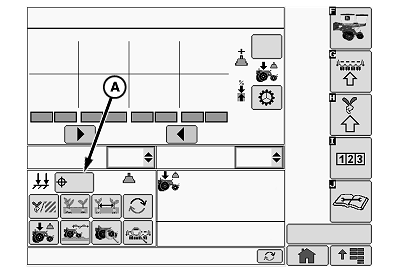
A67016-UN-04MAY10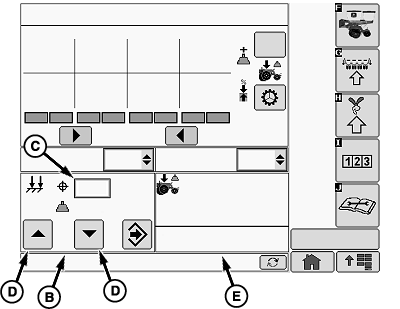
A67017-UN-03MAY10A - Down Force Target Button
B - Down Force Input Screen
C - Down Force Input Box
D - Increase or Decrease Arrows
E - Down Force Details Screen
Select the down force target button (A) to open the down force input screen (B).Set target row unit down force by using the down force input box (C) or increase or decrease arrows (D).
Down force details screen (E) also becomes active.
OUO6064,00001BF-19-20100720 |