Variable-Rate Drive Machines
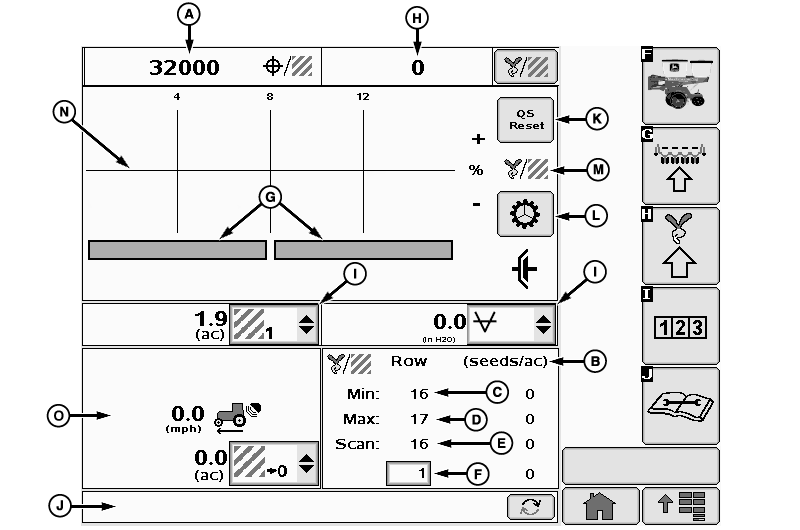
A67786-UN-18JUN10
A - Target Population Rate
B - Seeds Per Area
C - Scanned Row Number
D - Row With Minimum
E - Row With Maximum
F - Row Selected
G - Drive Indicator
H - Average Population
I - List Boxes
J - Planter Cautions
K - Quick Start Button
L - Rotate Seed Meters Button
M - Planter At A Glance
N - Population Bar
O - Counters and Speed
Select Menu button >> Planter button >> Main softkey.(A) Target Population Rate (seeds per area). If multiple variable-rate motors deliver different rates, the bar is divided.
(B) Seeds per Area for active scan row (Scan mode).
(C) Active Scan Row (Scan mode).
(D) Row number delivering minimum population.
(E) Row number delivering maximum population.
(F) Selected row population.
(G) Drive Status Bar: Shows whether meter drives are active or inactive. The status bar is divided into the number of drive sections on the planter. Green is active. Gray is inactive. When a disconnect is selected, the green bar for that drive section turns gray, the meter drives stop, and the population bars turn red as the population drops to zero on the disconnected rows. The status bar does not turn green again and the Planter at a Glance population bars do not become active again until all rows in the disconnected drive section deliver greater than two seeds per second.
(H) Average population across entire machine (seeds per area).
(I) List boxes contain functional options for the operator to select for display.
(J) Planter Cautions.
(K) Quick Start button appears when quick start is enabled.
(L) Rotate seed meters button.
(M) Planter at a glance screen area.
(N) Population Bar. Orange when planting above or below alarm set points. Red when not planting.
(O) Counters and speed are displayed in lower section of screen.
Planter-At-A-Glance Bar Graph The line in the middle is the target population. When a row approaches the upper or lower limit, the bar for that row turns orange and an alarm sounds along with a text message. If a row falls below two seeds per second, the bar turns red and a row failed warning appears. The top of the graph is the programmed upper limit. The bottom of the graph is the programmed lower limit.
OUO6064,00001C3-19-20100618 |