Headland Warning Suppression
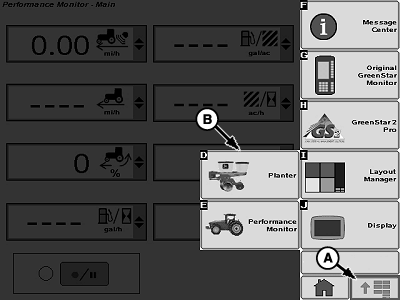
A59588-UN-12MAR07
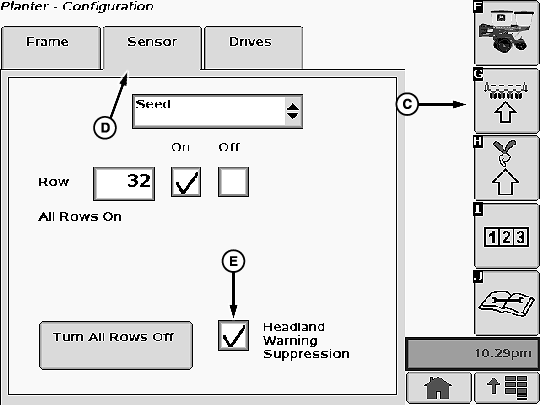
A65051-UN-29JUL09
A - Menu Button
B - Planter Button
C - Configure Softkey
D - Sensor Tab
E - Box
Headland Warning Suppression ONLY suppresses the Rows Not Planting warnings when the height sensor or switch indicates that the planter frame is raised. It does not disable any other planter warnings.To enable Headland Warning Suppression:
Select Menu >> Planter button >> Configure softkey >> Sensor tab
Place a check mark in Headland Warning Suppression box (E).
Remove check mark from box to disable Headland Warning Suppression.
On Ground Driven planters without RowCommand™, a height sensor MUST be installed and calibrated for Headland Warning Suppression to function. See your John Deere dealer.
Planters equipped with Variable Rate Drive and ground driven planters equipped with RowCommand™ have a height sensor installed.
Screen Area Information
Menu - Menu
Planter - Planter
Configure - Configure
Sensor - Sensor
Headland Warning Suppression - Headland Warning Suppression
OUO6064,00001F3-19-20100630 |