Controller Hardware, Software, and Part Number Identification

A59325-UN-19FEB07
Menu
A59551-UN-08MAR07
Planter Button
A59567-UN-08MAR07
Diagnostic Softkey
A61129-UN-11OCT07
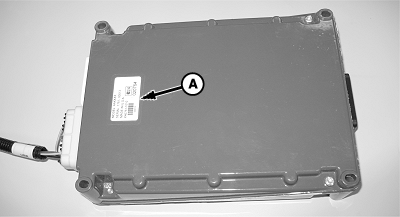
Controller
A - Serial Tag
There are separate hardware and software versions for the display and each controller. Use the version to identify machine controllers for your dealer. Keep both the display and planter controller(s) updated with the latest software version for best performance and latest features. Software updates are only available through your John Deere™ dealer.Select Menu >> Planter Button >> Diagnostic softkey >> Readings tab.
Select Hardware / Software from top drop down box.
Select Main or Auxiliary from second drop down box to view data from each controller. Auxiliary is only an option if there is more than one controller installed on the machine.
- Hardware serial number and part number are displayed.
- Serial number is also on a tag (A) attached to controller.
- Software part number and version number are displayed.
- Total hour meter for controller is at bottom of screen.
Screen Area Information
Planter Diagnostics - Planter Diagnostics
Readings - Readings
Hardware / Software - Hardware / Software
Main - Main
Auxiliary - Auxiliary
Hardware Part # - Hardware Part number
Planter - Planter
Hardware Serial # - Hardware Serial number
Software Part # - Software Part number
Software Version # - Software Version number
Hour Meter - Hour Meter
h - Hours
John Deere is a trademark of Deere & Company | OUO6064,000020C-19-20100721 |