EPM Status

A59325-UN-19FEB07
Menu

A59551-UN-08MAR07
Planter Button

A59567-UN-08MAR07
Diagnostic Softkey
Use this to check the status of EPMs on the machine.Select Menu >> Planter button >> Diagnostics softkey >> Readings tab.
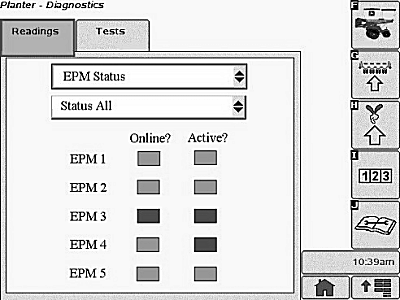
Select EPM Status from drop down box to see which EPMs are operational. All will be displayed with online or active. Green box means true, red box means false.
Select drop-down to view EPMs each input status or status all to view all.
Screen Area Information
Planter Diagnostics - Planter Diagnostics
Readings - Readings
EPM Status - EPM Status
Online - Online
Active - Active
Status All - Status All
A63772-UN-07NOV08
This screen lists the current status for each EPM that is required for the current row configuration.
If the EPM is Online, the status box appears in green. If not online, the status box is red.
If the EPM is Active, the status box appears in green. If not active, the status box is red.
A63773-UN-07NOV08
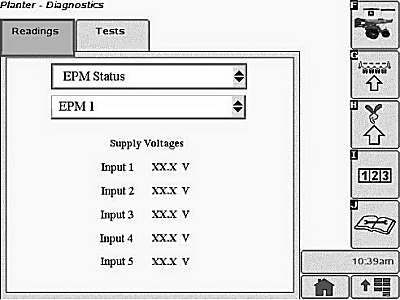
This screen lists the voltage reading from each power supply input to the EPM, as an average over approximately 3 seconds. If no readings are received from the device in 3 seconds, the reading is “— —”
A63775-UN-10NOV08
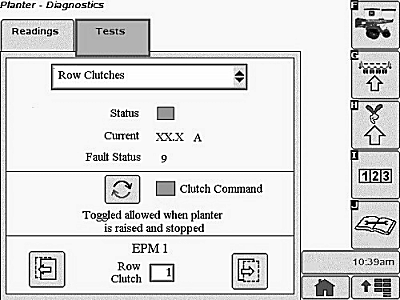
Status information derived from the driver status CAN message is displayed.
If the driver output monitor is ON, the status box appears in green.
If the driver output monitor is OFF, the status box appears in red.
The button in the center of the page is used to toggle rows on or off when the planter is stopped and raised.
The forward and backward arrows at the bottom of the page are used to select between row clutches.
A specific RowCommand™ clutch can be selected by entering a row number.
OUO6064,0000215-19-20100721 |