Row Clutches

A59325-UN-19FEB07
Menu

A59551-UN-08MAR07
Planter Button

A59567-UN-08MAR07
Diagnostic Softkey

A61134-UN-12OCT07
Previous Page
A61135-UN-12OCT07
Next Page
A63529-UN-27OCT08
Toggle
Use this to identify the row clutches detected by the monitor.Select Menu >> Planter button >> Diagnostics softkey >> Tests tab.
Select Row Clutches from drop down box to see status of each row clutch. Green box means true, red box means false.
Select toggle icon to enable clutch command. Green box means true, red box means false.
Select row clutch input box and enter desired row clutch to view or press next page icon and previous page icon to navigate.
Screen Area Information
Planter Diagnostics - Planter Diagnostics
Tests - Tests
Row Clutches - Row Clutches
Status - Status
Current - Current
Fault Status - Fault Status
Clutch Command - Clutch Command
Row Clutch - Row Clutch
A63774-UN-10NOV08
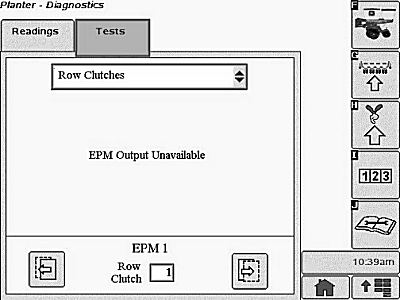
This screen appears when the operator selects the “Tests” tab on the diagnostics screen and the EPM is not available for one of the following reasons:
- EPM is offline
- EPM is not communicating
- EPM input voltage is out of range
OUO6064,0000216-19-20100721 |