Monitor Controls
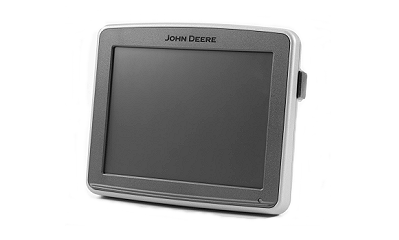
A71621-UN-20MAY11
GreenStar™ 2630 Touch Screen Monitor
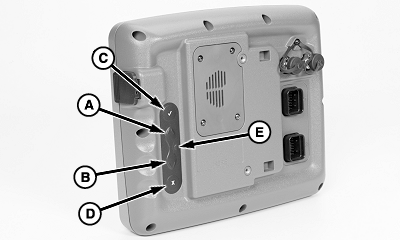
A71622-UN-20MAY11
GreenStar™ 2630 Touch Screen Monitor
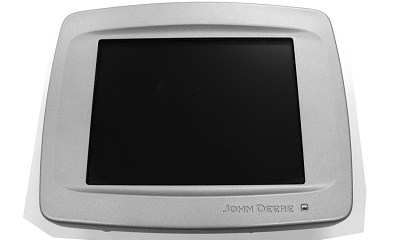
A61842-UN-22JAN08
GreenStar™ 2100 and GreenStar™ 2600 Touch Screen Monitor
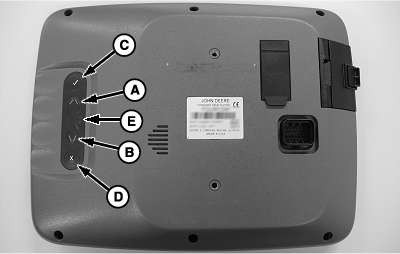
A61830-UN-09JAN08
GreenStar™ 2100 and GreenStar™ 2600 Manual Controls
A - Up Arrow
B - Down Arrow
C - Check Mark
D - Clear or Cancel
E - Reset
With the touchscreen monitor, touch the screen over the image of the item to activate. The following pages describe the types of items that are selectable.If the touchscreen malfunctions or if fingers are greasy or dirty, use manual control on back of monitor. Use the up arrow (A) and down arrow (B) to toggle through the screen selections. Use the check mark (C) to select a highlighted selection on the screen. Use the X (D) to clear a selection or cancel an entry. If the screen fails to respond, hold the reset (E) until monitor restarts.
A62351-UN-29MAR08
A62354-UN-29MAR08
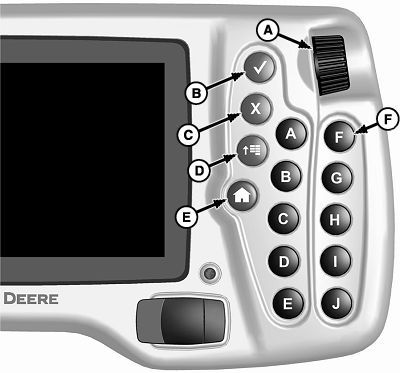
A - Thumbwheel
B - Enter
C - Cancel
D - Menu
E - Home
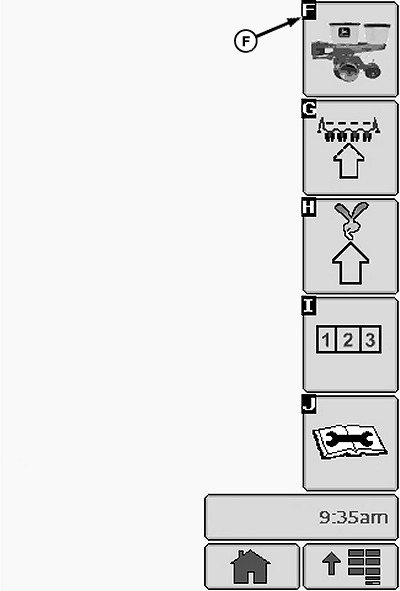
F - Quick Select Buttons
With the control pad monitor, use the thumbwheel (A) to scroll through selectable items on screen. Each item highlights as the wheel is turned. Use the enter button (B) to activate a highlighted item. Use the cancel button (C) to cancel the previous action. Use the menu button (D) to return to the main menu screen. Use the home button (E) to return to the home screen. Use the quick selection buttons (F) to select an item, with the same letter on screen, without using the thumbwheel to highlight the item first.|
OUO6064,00004CF-19-20110520 |