Bridged and Blocked CCS System
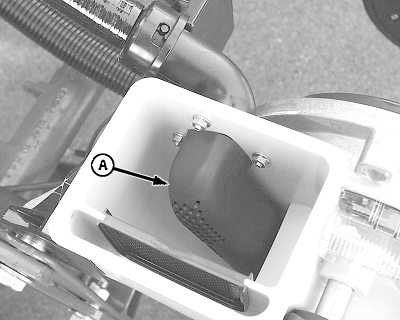
A54895-UN-22SEP04
Pro-Series™ Hopper Shown
A - Hopper Discharge Elbow
If seed monitor issues a Row Failed warning, first determine if seed delivery tube is plugged or product is bridged in CCS tank. To determine cause, do the following:-
Start CCS fan.
-
Remove lid from affected row unit hopper.
-
Observe the amount of air flowing through hopper discharge elbow (A).
- If Low Air Flow is noted, the CCS delivery hose has plugged. See Remove CCS Hose Blockage in this procedure.
- If High Air Flow is noted, product has bridged in CCS manifold. See Product Has Bridged in CCS Tank Manifold in this procedure.
Remove CCS Hose Blockage
-
Turn off CCS fan.
-
Remove seed delivery hose from affected row unit.
-
Shake hose vigorously from hopper to CCS tank until blockage spills from end of hose.
-
Reconnect hose.
-
Start CCS fan and check that seed flows into hopper.
-
If no seed flow is observed, repeat procedure.
Product Has Bridged in CCS Tank Manifold
A50710-UN-17OCT02
A62189-UN-06MAR08
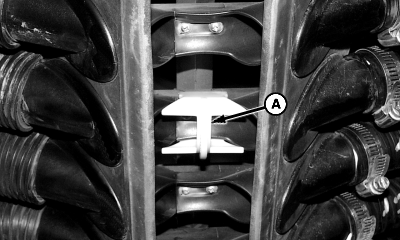
A - Nozzle Insert
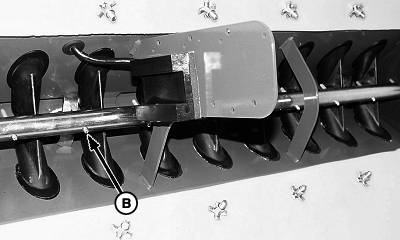
B - Pins
-
The following items must be checked to ensure proper operation of CCS system:
- CCS tank pressure set to recommended setting for crop being planted.
- Tank agitator turning when CCS fan is on.
-
Nozzle inserts (A) installed or removed for specific crop being planted.
-
Agitator pins (B) centered between tank nozzles.
-
IMPORTANT: DO NOT exceed 24 in. of tank pressure or damage can occur to the hydraulic motor and seed tank lids.
If all conditions are addressed and bridging still occurs, increase CCS tank pressure in 1 inch increments until seed flows properly to all rows.
|
OUO6045,0000001-19-20090527 |