Vacuum Meter Operating Characteristics
A68173-UN-14JUL10
A68177-UN-14JUL10
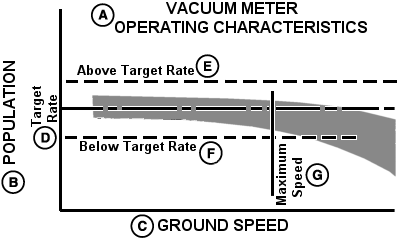
A - Vacuum Meter Operating Characteristics
B - Population
C - Ground Speed
D - Target Rate
E - Above Target Rate
F - Below Target Rate
G - Maximum Speed
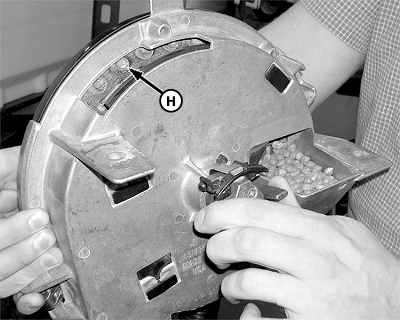
H - Seed
The operating band (gray area) illustrates how a vacuum meter performs in relation to target population (indicated by horizontal line).The width of the operating band varies based upon:
- Various sizes and shapes of seeds
- Planting rate variations
- Field Conditions
In most cases, meter accuracy does not decline unless maximum planting speed is exceeded.
The maximum speed can vary based upon field conditions. Rough field conditions can knock seed off seed disks and can cause row unit bounce which can severely affect seed placement. Adding attachments such as pneumatic down force can improve seed placement in rough field conditions.
Always verify that the correct seed disk is used for seed selection. If the seed is unusually sized or shaped, a disk for a different crop may work better. See SEED DISK RECOMMENDATIONS in this Section or your John Deere™ dealer.
If seed varies widely in size and shape, a flat disk and double eliminator can provide better population control.
To check for the proper seed disk application:
- Remove meter from seed hopper.
- Place seed in meter.
- Connect vacuum hose to meter dome.
- Activate vacuum to recommended level for crop.
- Turn meter by hand to verify that only one seed (A) fits into each cell.
|
CROP STAND = SEED SINGULATION + SEED PLACEMENT + AGRONOMIC FACTORS |
|
|---|---|
|
Seed Singulation = Seed Selection + Seed Disk Selection + Vacuum Level + Field Conditions + Maintenance |
|
|
Seed Placement = Row Unit Maintenance + Speed + Field Conditions + Planter Attachments + Observation & Adjustment |
|
|
Agronomic Factors = Seed Germination + Soil Temperature + Moisture + Nutrients + Pest Control + Weather |
|
|
OUO6045,0000704-19-20100714 |