Change Row Spacing From 38 cm (15 in.) To 76 cm (30 in.) DB60 47 Row
Check List for Following Procedure:
□ Remove seed from CCS tanks and row units.
□ Drawbar in center position.
□ Install yellow plugs on all rear rank row units (vacuum and seed delivery hoses).
□ If equipped, release pneumatic pressure from rear rank rows.
□ Manually lock up rear rank row units.
□ Disconnect meter drives on rear rank row units.
□ Remove and install correct seed disks.
□ Configure seed monitor to read only active rows.
□ Adjust vacuum level.
□ Adjust seed population.
□ Adjust CCS tank pressure.
□ Adjust markers to proper length.
-
Remove seed from all row unit meters. See CLEAN OUT PRO-SERIES XP™ SEED HOPPERS AND METERING UNITS in Operate Machine section.
-
Clean out CCS tanks. See CLEANING OUT CCS TANKS in Pro Series XP CCS Seed Delivery section.
-
Tractor drawbar in center position.
-
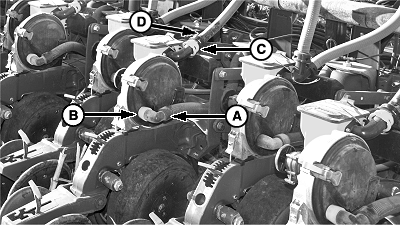
A62717-UN-24JUN08A - Vacuum Hose
B - Plug
C - Seed Delivery Hose
D - Plug
Remove vacuum hose (A) from all rear rank row unit meters. Insert provided plug (B) into vacuum port, and reconnect vacuum hose to meter. -
Remove seed delivery hose (C) from rear rank row unit meters. Insert provided plug (D) into meter inlet and reconnect seed delivery hose on meters.
-
Exhaust pressure from rear rank rows. (See DEPRESSURIZE PNEUMATIC DOWN FORCE SYSTEM in your SeedStar 2™ and SeedStar XP™ Monitor Operator’s Manual.)
-
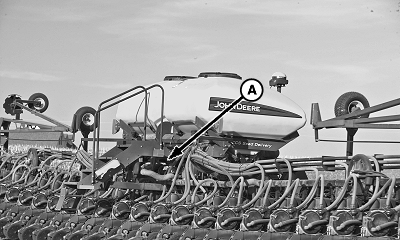
A62715-UN-24JUN08A - Location
Remove row unit lock-up bar from storage location (A) under rear CCS tank steps. -
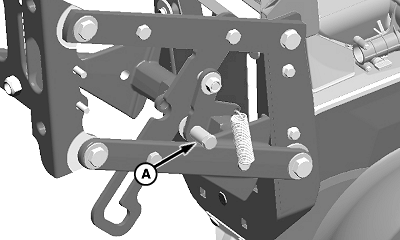
A62716-UN-24JUN08A - Latch
Place row unit lock-up latch (A) in position shown. -
NOTE: On machines with the rear hitch option, there is not enough clearance for lock-up bar (A) to attach to row unit nearest hitch. Extend drawbar cylinder and slowly lower frame until remaining unit locks.
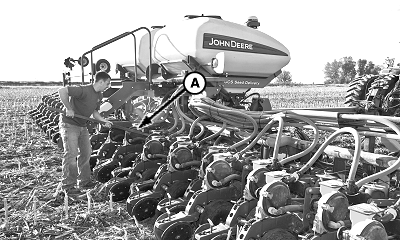
A62754-UN-01JUL08A - Lock-Up Bar
Use lock-up bar (A) to raise and lock rear row units up as shown. -
On machines with rear hitch, raise hitch and slowly lower frame until row units are at full length of travel.
-
Raise machine and confirm rear row units are locked up.
-
Disengage meter drive on all rear rank row units. See DISENGAGE METER DRIVE in Operate Machine section.
-
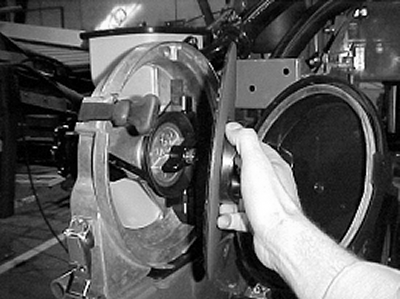
A50391-UN-26SEP02Seed Disk
Replace seed disks on front rank row units. -
NOTE: See your SeedStar™ Monitor Operator's Manual.
Change monitor settings to match number of rows planting.
- Select Menu >> Planter button >> Rates softkey >> Select crop name for crop to be planted, and check appropriate check box for number of rows planting.
-
Reset vacuum level.
-
Make necessary adjustments to the front rank row units for correct seed placement and seed trench closing.
-
Adjust marker to correct length for desired row spacing. See ADJUST MARKERS in this section.
|
OUO6064,0000477-19-20110419 |