Setting CCS Row Unit Fan Switch
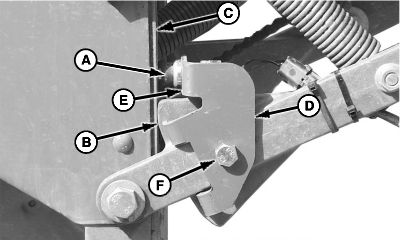
A71634-UN-23MAY11
A - Row Unit Switch
B - Stop
C - Frame
D - Bracket
E - Flat Surface
F - Cap Screw
The CCS row unit switch (A) turns the CCS fan and agitator on and off as machine is raised and lowered.-
Completely raise machine. Lower parallel arm stop (B) should be touching planting unit frame (C).
-
Rotate sensor bracket (D) until flat surface (E) is 20 mm (3/4 in.) from planting unit frame.
-
Tighten cap screw (F).
-
IMPORTANT: Avoid machine damage. Agitator will continue to run as long as tractor power is provided, if switch is not adjusted to deactivate when frame is raised.
NOTE: Tractor electrical power must be supplied when adjusting.
Observe agitator on CCS tank and adjust switch so agitator will shut off when frame obtains this fully raised position. This adjustment also ensures the CCS fan and agitator will engage the moment this row unit contacts the ground when lowered.
|
OUO6064,00004DF-19-20110523 |