Remove Pro-Series™ XP Seed Meter Assembly From Row Unit
-

A62348-UN-27MAR08Unlocked Symbol Up
A49955-UN-03DEC02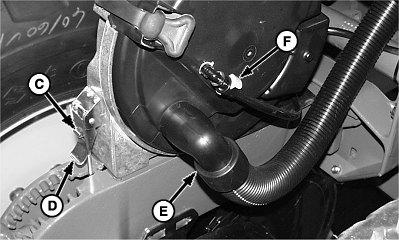
A53366-UN-20NOV03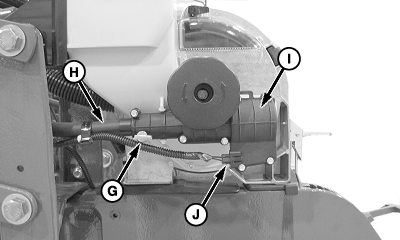
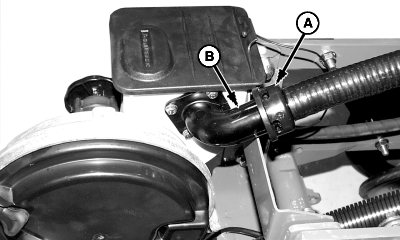
A68221-UN-30JUL10A - Delivery Hose
B - Fill Neck
C - Clip
D - Latch
E - Vacuum Hose
F - Clip
G - Lock Pin
H - Drive Cable
I - Gearbox Housing
J - Electrical Connector
Rotate CCS seed delivery hose (A) counterclockwise until it unsnaps from hopper fill neck (B) and pull off hose. -
Rotate lock pin (G) 180 degrees until the “unlocked” symbol is on top.
-
Remove vacuum hose (E).
-
If row is monitored for vacuum pressure, pull clip (F) sideways to unlock and pull sensor hose off fitting.
-
Push down on clip (C) while lifting up on latch (D) to unlock meter assembly from row unit.
-
Disconnect electrical connector (J) from gearbox housing (if equipped).
-
Pull Pro-Shaft Drive cable (H) from gearbox housing (I) while raising rear of meter upward and rearward.
|
OUO6074,000088B-19-20100730 |