Install Hopper Extensions (Pro Only)
-
NOTE: When sugar beets are used or when using seed not approved for CCS bulk tank delivery, the seed must be added to the hoppers not the CCS tanks. The extensions allow for more seeds to be planted. Extensions can be used when planting seed plots.
Disable CCS fan when using mini-hopper extensions.
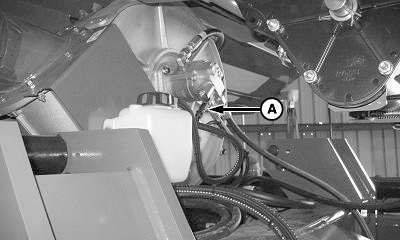
A74976-UN-23MAR12A - CCS Solenoid Harness
Disconnect harness (A) to disable CCS fan. -
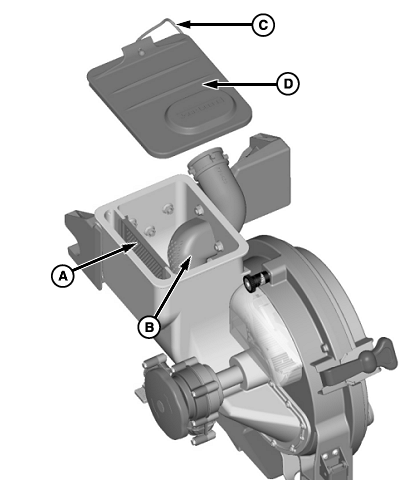
A55143-UN-31MAR06A - Screened Divider
B - Discharge Elbow
C - Tether
D - Lid
Remove screened divider (A), discharge elbow (B) and tether (C) from lid (D). -
NOTE: Do not install more than two extensions onto a mini-hopper. If two extensions are added, order cap (B) from your John Deere™ dealer and install onto the CCS elbow (C). The cap prevents seed from flowing back into the CCS hose.

A55144-UN-31MAR06A - Non-Screened Divider
B - Cap
C - Elbow
D - Extension
E - Lid
Install non-screened divider (A), one or two extensions (D) onto the mini-hopper, and lid (E) onto the upper extension.NOTE: Hopper extensions can be left on the mini-hopper when using CCS delivery system. To return to CCS system use, install vented screen removed in step 2, reconnect CCS fan harness, and remove cap (if used). If solid screen (A) is not replaced, the mini-hopper overfills and seed spills out of the mini-hopper.
|
OUO6435,0001DC1-19-20120323 |