Select The Correct Field Corn Seed Disk For Optimum Performance
|
Corn Seed Disk Selection Guide |
|||||
|---|---|---|---|---|---|
|
Seed Shape |
Seed/kg (Seed/lb.) |
Disk Name |
Part Number |
Number of Cells (Hole Diameter [mm]) |
If population is difficult to control: |
|
Non-Uniform (mixed shapes) |
Mixed Sizes (Mixed Sizes) |
ProMax 40 With Double Eliminator |
A52391 |
40 (4.5) |
If over or under populating with starting disk, adjust double eliminator |
|
Uniform Flat |
Less than 3308 (1500) |
ProMax 40 With Double Eliminator |
A52391 |
40 (4.5) |
If over or under populating with starting disk, adjust double eliminator |
|
Uniform Flat |
3308-6175 (1500-2800) |
Small Corn Disk |
A43215 |
30 (3.6) |
Adjust vacuum first. If problems persist, switch to overlapping disk shown in vacuum level chart1 |
|
Uniform Flat |
Greater than 6175 (2800) |
Sunflower and Popcorn |
H136478 |
30 (2.6) |
Adjust vacuum first. If problems persist, switch to Small Corn Disk (A43215) |
|
Uniform Round |
Less than 3308 (1500) |
Standard Corn Disk |
A50617 |
30 (3.6) |
Adjust vacuum |
|
Uniform Round |
3308-6175 (1500-2800) |
Small Corn Disk |
A43215 |
30 (3.6) |
Adjust vacuum first. If problems persist, switch to Standard Corn Disk (A50617) |
|
Uniform Round |
Greater than 6175 (2800) |
Sunflower and Popcorn |
H136478 |
30 (2.6) |
Adjust vacuum first. If problems persist, switch to Small Corn Disk (A43215) |
Use the Corn Seed Disk Selection Guide chart first to determine the recommended seed disk and then refer to vacuum level chart for initial vacuum setting.
Most corn seed can be planted near 100 percent of desired population when using proper vacuum levels and the small corn or standard corn seed disks (which have seed cells).
Using cell-type disks (Small and Standard Corn Seed Disks) requires careful seed selection for proper performance.
Metering performance is directly dependent on the consistency of seed sizing. Seeds that are mixed in shape and size do not perform optimally with cell-type disks. The ProMax 40 Disk (A52391) with double eliminator is required for optimum seed singulation and seed release when seeds vary in size.
NOTE: A knockout wheel is required when using John Deere Flat Disks.
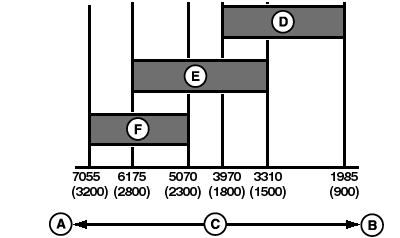
A68464-UN-27JUL10
Overlapping Seed Disk Chart
A - Small Seeds
B - Large Seeds
C - Seed Size, Seeds/kg (Seeds/lb.)
D - Standard Corn Disk
E - Small Corn Disk
F - Sunflower and Popcorn Disk
For seed sizes that overlap the Small Corn Disk (A43215) and the Standard Corn Disk (A50617), choose the Small Corn Disk for initial setting. If population is difficult to control, switch to Standard Corn Disk.DIFFICULT TO PLANT SEEDS
- Difficult to plant seeds include varieties with mixed sizes, mixed shapes, combinations of sizes and shapes, long and slender seeds, seeds with a sharp point (germ), and others.
- A ProMax 40 disk is a flat disk used to improved seed singulation with difficult to plant seeds. The ProMax 40 requires higher vacuum levels than cell type disks and requires the installation of a double eliminator and knockout wheel in each meter assembly.
-
ProMax 40 disks have 40 holes per revolution.
Machines with Mechanical Meters: Set seed transmission according to Corn Using ProMax 40 Disk rate chart when ProMax 40 disk is used to plant field corn.
Machines with Variable Rate Drive (VRD): Select ProMax 40 seed disk from list inSeedStar™ monitor. (See Setup Seed Rates section in SeedStar™ Operator's Manual)
- Quality graded seed also requires proper seed disk selection for optimal performance.
PLANTING CORN IN HILLSIDE CONDITIONS
The angle of a hillside or changing directions on a hillside can affect meter performance. If the left side of machine is the downhill side, skips are possible due to the seeds falling away from the seed disk and a smaller seed reservoir next to the seed disk. If the right side of machine is the downhill side, overpopulation is possible due to the seeds forced against the seed disk and a large seed reservoir next to the seed disk. To maximize vacuum meter performance on hillsides, follow these steps:
- Use round seed. Round seed remains in the cell of a cell type disk better and reduces the chance for doubles.
-
IMPORTANT: Properly set the mechanical transmission or program the VRD monitor when ProMax 40 disks are used to plant field corn. When using ProMax 40 disks, if cell type rate charts are used to set the transmission or the incorrect seed disk is programmed for VRD in the monitor, overpopulation occurs. Cell type disks have 30 cells.
Use a flat disk with double eliminator, if round seed is not available or hillsides are steep. The flat disk has no seed cells and requires higher vacuum levels, a double eliminator, and a knockout wheel. The double eliminator is used to remove one of two seeds covering a single hole in seed disk. The knockout wheel is used to remove debris from holes in seed disk.
|
SeedStar is a trademark of Deere & Company 1 For larger seed sizes less than 3970 seeds/kg (1800 seeds/lb.), switch to Standard Corn Disk (A50617). If population control problems persist, switch to ProMax 40 Disk (A52391) with double eliminator. For smaller seed sizes greater than 5072 seeds/kg (2300 seeds/lb.), switch to Sunflower and Popcorn Disk (H136478). If population control problems persist, switch to ProMax 40 Disk (A52391) with double eliminator. |
WP29706,000036F-19-20120509 |