Inspect and Service MaxEmerge™ XP Vacuum Meter
 CAUTION:
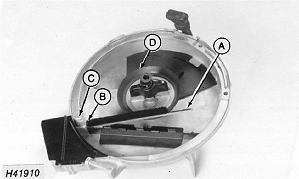
H41910-UN-08MAY90
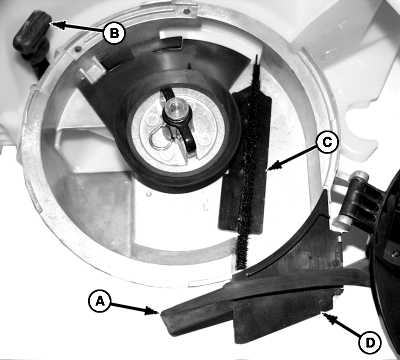
A - Brush
B - Narrow End
C - Housing
D - Seal
Follow chemical manufacturer's precautions when handling parts coated with seed treatments. Use proper skin, eye, and respiratory protection.Annually inspect seed meter for wear and chemical or seed treatment buildup.
-
Check brush (A) for gaps. If gaps are big enough to allow seed to pass through, replace brush as follows:
-
Insert narrow end (B) into slot first.
-
Snap brush into slot until it contacts side of meter housing (C).
-
-
Replace hub seal (D) if cracked or weathered.
-
NOTE: Before disk replacement, properly set meters and vacuum. Perform a field check to determine if disk meters seeds accurately. (See Check Seed Population section.)
If metering performance is satisfactory, it is not necessary to replace seed disk.
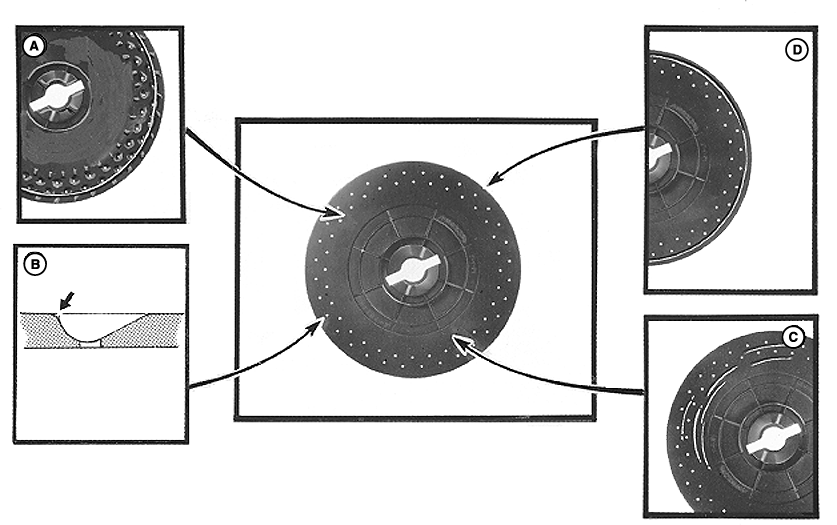
A55426-UN-22NOV04A - Wear Example
B - Worn Edge (Seed Cell Side View)
C - Wear Example
D - Wear Example
Check seed disks for wear in following areas and replace as needed.A small amount of wear around perimeter of disk (A) is acceptable. If worn, check for seed loss through gap between disk and housing.
Seed loss can be eliminated with hub adjustments. (See ADJUST METER HUB in the Rate Charts and Settings Operator's Manual.)
Inspect individual seed cells. Seed abrasion can wear sharp edges on seed cells (B) and increase cell size. (Increased cell size can cause overpopulation when planting small seed or cause under-population when planting large seed). Replace seed disk if cell size is increased and field checks determine a reduction in accuracy.
Small grooves or scratches are acceptable on vacuum side of seed disk (C).
Wear around perimeter of disk (D) is acceptable up to an approximate depth of 1.0 mm (3/64 in.).
-
NOTE: If vacuum seals are replaced, apply Graphite Spray TY25797 on vacuum side of used seed disks. (See Lubrication section.) New seed disks are factory lubricated.
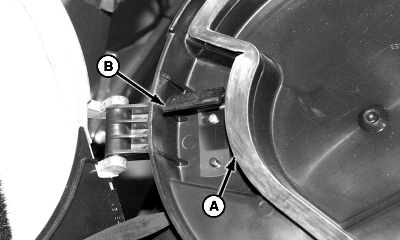
A51188-UN-19NOV02A - Seals
B - Wiper
Replace vacuum seals (A) if seed disks are replaced or when large cracks or wear areas are visible. -
Replace disk wiper (B) if edge of wiper is grooved or excessively worn.
-
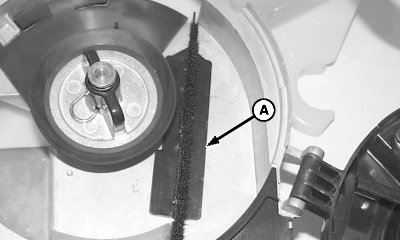
A51321-UN-02DEC02A - Plastic
Annual cleaning of vacuum meters and seed disks is recommended. Use mild detergent and a soft brush to remove any seed treatment buildup behind plastic (A) in vacuum meter housing. -
A51322-UN-05DEC02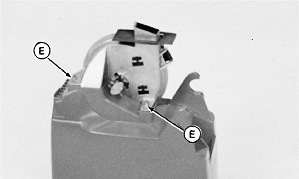
H44347-UN-14APR92A - Dust Cover
B - Handle
C - Plastic Insert
D - Chute Cover
E - Nuts
Replace vacuum meter dust cover (A) if it does not fit properly, is cracked, or weathered. -
Replace rubber handle (B) if cracked or broken.
-
Replace plastic insert (C) and chute cover (D) if worn.
-
Verify drive coupler pivots freely. Disassemble, clean, and lubricate with molybdenum disulfide grease if flex drive does not pivot freely.
-
Place vacuum meter assembly on hopper and attach with nuts (E).
|
OUO6074,00008DD-19-20120510 |