Additional Quick Reference Setup for Seedstar™ XP
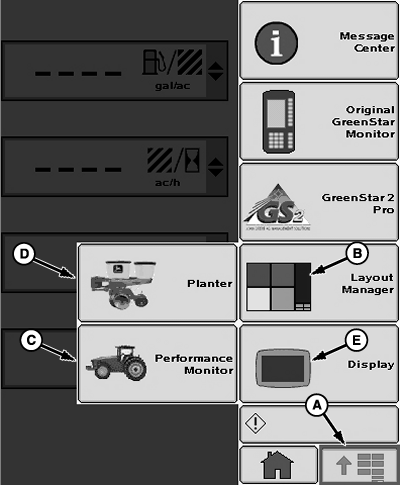
A61139-UN-12OCT07
Main Menu Screen
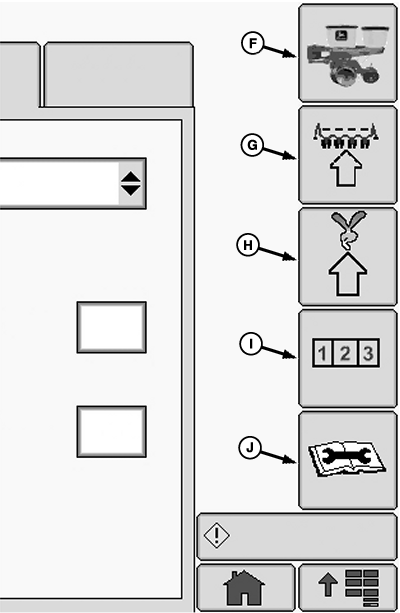
A61140-UN-15OCT07
Planter Application Screen
A - Main Menu
B - Layout Manager
C - Performance Monitor
D - Planter Application
E - Display Application
F - Planter Main
G - Planter Configuration
H - Planter Rates
I - Planter Totals
J - Planter Diagnostics
The following reference assumes that the operator has read and understands this manual. Some button images are given on this page as a reminder. Some entries require certain information be set up first. Follow quick reference in sequence.
|
Quick Reference |
|||
|---|---|---|---|
|
Down Force at a Glance Run Screen |
>>Active PDF Check Box. |
Select to enable or disable Active Down Force Visible in Active PDF capable planters only. When disabled, down force display values switch to the readings taken from the PDF air pressure sensors. |
|
|
Planter Sensor Configuration |
>> Sensor Tab |
||
|
>> Down Force |
>> Sensors: Drop Down |
Select number of down force sensors on machine. |
|
|
>> Sensor Drop Down |
Select sensor. |
||
|
>> Row Drop Down |
Select row. |
||
|
>>Rank Drop Down |
Select rank. The rank drop down box is only visible when Split Row is selected on the Frame Configuration screen. |
||
|
>> Check Box |
Enable or disable sensor. |
||
|
>>Calibration Value Input Box |
Enter calibration value for each gauge wheel down force sensor. John Deere™ sensors are 1394. |
||
|
>>Zero Button |
Zero each gauge wheel down force sensor. |
||
|
>> Ride Quality |
>> Sensors: Drop Down |
Select number of ride quality sensors on machine. |
|
|
>> Sensor Drop Down |
Select sensor. |
||
|
>> Row Drop Down |
Select row. |
||
|
>> Check Box |
Enable or disable sensor. |
||
|
PDF Air Pressure (Set-Point Down Force) |
>>Calibration Value Input Box |
Configures the value used by the air pressure sensor to determine actual air pressure value. John Deere™ sensor calibration value is 494. |
|
|
>>Continue Button |
Select this button to zero air pressure sensor. |
||
|
PDF Air Pressure (Active Down Force Single Rank) |
>>Number of Ranks Drop Down Box |
Select rank. |
|
|
>>Calibration Value Input Box |
Configures the value used by the air pressure sensor to determine actual air pressure value. John Deere™ sensor calibration value is 494. |
||
|
>>Continue Button |
Select this button to zero air pressure sensor. |
||
|
PDF Air Pressure (Active Down Force Dual Rank) |
>>Number of Ranks Drop Down Box |
Select rank. |
|
|
>>Sensor Drop Down Box |
Select Sensor. |
||
|
>>Calibration Value Input Box |
Configures the value used by the air pressure sensor to determine actual air pressure value. John Deere™ sensor calibration value is 494. |
||
|
>>Continue Button |
Select this button to zero air pressure sensor. |
||
|
Diagnostics |
|||
|
>> Diagnostic Softkey >> Readings tab |
>> Sensors/Status |
Observe readings of programmed sensors. |
|
|
>> System Voltages |
Provides system data. |
||
|
Down Force |
Displays down force sensor pressure and voltage. |
||
|
Ride Quality |
Displays ride quality sensor percentages. |
||
|
Planter at a Glance — User Settings |
>> Select and hold the Screen Scan button for 4 seconds. |
||
|
Alarms and Limits Setup Page |
>> Select and hold any of the SeedStar™ XP buttons for 4 seconds. |
||
|
OUO6064,00005B5-19-20111110 |