Raising and Lowering Markers with Independent SCV
NOTE: If machine is equipped with drawbar hitch, the drawbar hitch control switch must be in the MARK position for markers to operate.
NOTE: If the AUTO-MAN switch is in the neutral (middle) position, the markers do not operate.
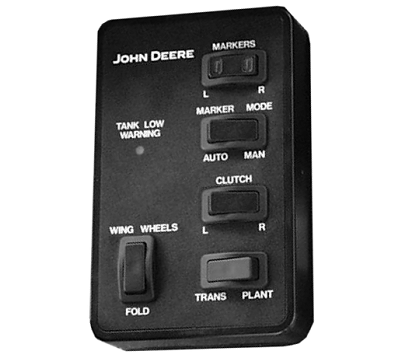
A78930-UN-21OCT13
12/16 Row
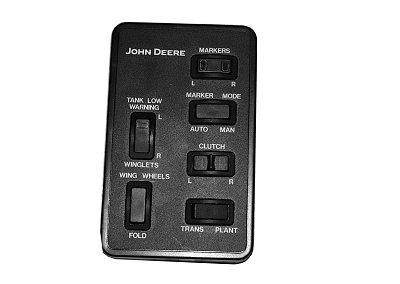
A52965-UN-30SEP03
24 Row
MANUAL WINGLET OPERATION—24 Row Only:-
NOTE: Winglet must be folded out before any marker operation performs.
Place TRANS-PLANT mode switch in PLANT position.
-
Place WINGLET switch in L position to control left winglet or R position to control right winglet.
-
Activate marker SCV to raise and lower designated winglet.
NOTE: Marker automatically raises when raising designated winglet.
AUTOMATIC ALTERNATION:
-
Place TRANS-PLANT mode switch in PLANT position.
-
Place AUTO-MAN marker mode switch in AUTO position.
-
Activate the marker lift SCV and frame lift SCV. The frame must be completely raised to activate marker alternating switch.
-
NOTE: Green light in the MARKERS switch indicates which marker will lower in Auto mode.
Activate frame lower SCV and marker lower SCV. Opposite marker will automatically lower.
MANUAL ALTERNATION:
-
NOTE: The MARKERS switch has two lights in it. The indicator light shows which marker will function.
Place TRANS-PLANT mode switch in PLANT position.
-
Place AUTO-MAN marker mode switch in MAN position.
-
Place MARKERS switch in L position to control left marker or R position to control right marker.
-
Activate marker SCV to raise and lower designated marker. Markers will not automatically alternate in this mode. Right and left marker must be manually selected.
LIFTING OVER A FIELD OBSTRUCTION:
-
Place TRANS-PLANT mode switch in PLANT position.
-
Place AUTO-MAN marker mode switch in MAN position.
-
Activate marker SCV to raise marker and avoid obstruction.
-
Select marker with MARKERS R (right) or L (left) switch.
-
Activate marker SCV to lower again.
-
Return AUTO-MAN marker mode switch to desired selection.
LOWERING BOTH MARKERS:
-
Place TRANS-PLANT mode switch in PLANT position.
-
Place AUTO-MAN marker mode switch in MAN position.
-
Select a marker with MARKERS R (right) or L (left) switch.
-
Lower marker.
-
Select other marker with MARKERS R (right) or L (left) switch.
-
Lower other marker.
-
Place AUTO-MAN marker mode switch to desired selection. Both markers will retract when SCV is activated to raise markers.
|
OUO6435,0001F43-19-20131018 |