Install and Remove BrushBelt™ Delivery Cartridge
Remove BrushBelt™ Delivery Cartridge
-
NOTE: Runoff BrushBelts while stationary to dry them before planting during wet conditions. (See the SeedStar 3 HP Operator’s Manual for BrushBelt™ Runoff procedures.)
A83749-UN-29SEP14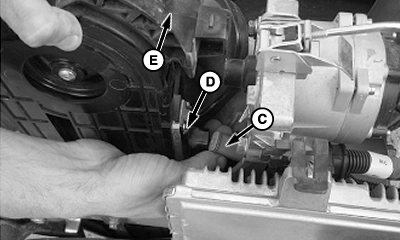
A79602-UN-28OCT14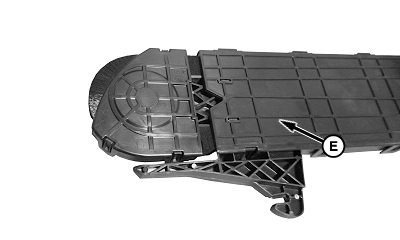
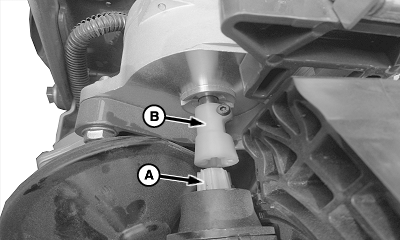
A83280-UN-13AUG14A - Drive Shaft
B - Motor Coupler
C - Harness Connector
D - Seed Sensor
E - BrushBelt™ Delivery Cartridge
Remove seed meter and hopper. (See Remove ExactEmerge Meter Assembly From Row Unit in previous section.) -
NOTE: When planting seeds in ground deep, depth handle must be moved to middle position before attempting to remove BrushBelt™ delivery cartridge from each row unit.
Separate BrushBelt™ drive shaft (A) and motor coupler (B) by pulling back on the top of BrushBelt™ delivery cartridge (E).
-
Pull upward on cartridge and disconnect harness connector (C) from seed sensor (D) on BrushBelt™ housing.
-
Remove cartridge from row unit.
Install BrushBelt ™ Delivery Cartridge
-
A78705-UN-13DEC13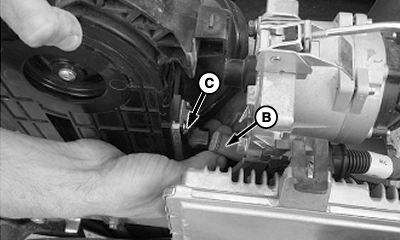
A77770-UN-13DEC13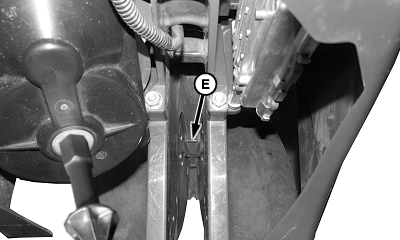
A83754-UN-29SEP14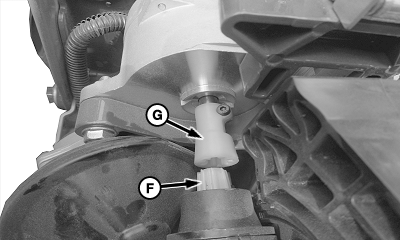
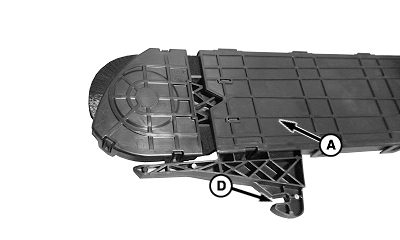
A83755-UN-29SEP14A - BrushBelt™ Delivery Cartridge
B - Harness Connector
C - Seed Sensor
D - Hook
E - Alignment Pin
F - Drive Shaft
G - Motor Coupler
Remove seed meter and hopper. (See Remove and Install ExactEmerge Seed Meter in previous block in this section.) -
NOTE: Place harness connector inside planting unit at same time as BrushBelt™.
Partially install BrushBelt™ delivery cartridge (A) into row unit then connect harness connector (B) to seed sensor (C). Align and push hook (D) on alignment pin (E) until BrushBelt™ locks into position.
-
Install drive shaft (F) into motor coupler (G).
-
To lock into place, press cartridge forward.
|
WP29706,0000406-19-20141029 |