Double Eliminator Brush Adjustment
-
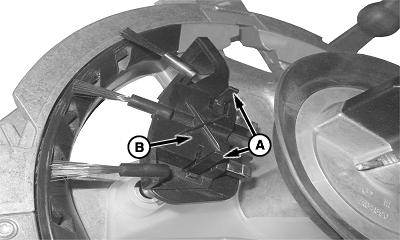
A79832-UN-21JAN14A - Tabs
B - Inner Double Eliminator Brush
Open vacuum meter and remove seed bowl. -
Adjust eliminator brush with the following steps:
-
Squeeze tabs (A) on inner double eliminator brush (B).
-
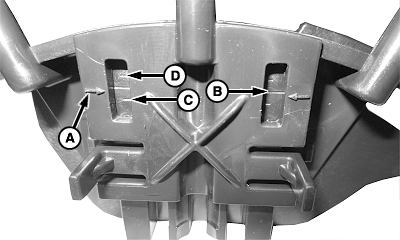
A83318-UN-18AUG14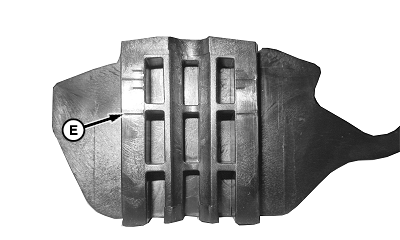
A83319-UN-18AUG14A - Pointer
B - Standard Position For Corn
C - Less Aggressive Position
D - Aggressive Position
E - Soybean Position
Slide eliminator brush until pointer (A) is level with adjustment line required.Position
Seed
Setting
B
Corn
Standard
C
Corn
Less Aggressive
D
Corn
Aggressive
E
Soybean
-
-
Middle line is standard position for corn (B).
-
Use position (C) if monitor shows skips are occurring and increasing vacuum has not helped. Verify that knock out wheel is engaged with the holes in the seed bowl if skips are present.
-
Use position (D) if monitor shows that multiples are occurring and decreasing vacuum has not helped.
-
Eliminator brush has only one position for soybeans (E).
-
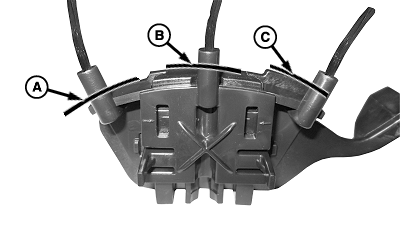
A83320-UN-18AUG14A - Left Side Of Support
B - Middle Of Support
C - Right Side Of Support
When reading pointer position is difficult, the top of brush is used as an indicator of position while being level with correct adjustment. Use the following example: Left side of brush is level with left side of support (A) when in less aggressive position. Middle of brush is level with middle of support (B) when in standard corn adjustment position. Right side of brush is level with right side of support (C) when in aggressive position. -
Release tabs on inner double eliminator brush to retain new position. Tabs snap when locked into position.
|
WP29706,000040A-19-20141031 |