Tighten Battery Terminal Connections
-
 CAUTION:
Help prevent serious injury or death from an electrical shock or electrocution. This planter is equipped with a 56 V electrical system which has high-voltage electrical current. Always use extreme caution when servicing the battery set in the planter.
A82413-UN-22APR14Avoid a short circuit or spark that results in an explosion, use extreme caution when using tools, wires, or metal objects near batteries. To prevent shorting out batteries, wrap tools with vinyl tape.
Remove all jewelry (watches, rings, bracelets, and others) before servicing the electrical system or batteries.
Access battery tray. (See ACCESS AND CHECK BATTERIES in this section.)
-
Clean battery compartment, terminal connections, cable ends, and batteries if necessary.
-
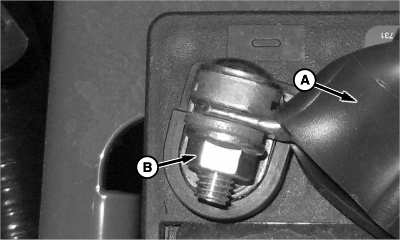
A82467-UN-01MAY14A - Terminal Boot
B - Battery Terminal Nut
Pull each terminal boot (A) on the terminal cables back far enough to expose each terminal connection. -
Use insulated tools when tightening each battery terminal nut (B) to specifications.
Item Measurement Specification Battery Terminal Nuts Torque 15 N·m (133 lb.-in.) -
Install the terminal boots back over each battery terminal.
-
After complete with terminal connections:
- Install battery cover and wing screws.
- Close CCS platform door and turn latches back to original positions on planter.
- Install previously removed harness connectors on outside of battery container.
|
WP29706,0000753-19-20140909 |