Set Vacuum Level
IMPORTANT: Some seed sizes and shapes require vacuum levels be adjusted slightly up or down from settings shown. Always verify vacuum level with field check. The chart provided in this block is a guide and is accurate in most conditions. Some situations require a higher or lower vacuum setting.
IMPORTANT: The hydraulic hookup procedure determines whether the tractor flow control valve or planter flow control valve is used to control vacuum level. See Attaching Machine section in machine operator's manual.
NOTE: Use this chart for initial vacuum setting and adjust as needed for conditions. This chart is for average ground speed and population rates. Increase vacuum for high rates or high ground speeds and decreased for low rates or low ground speeds.
NOTE: To zero SeedStar™ monitor vacuum sensors, refer to your SeedStar™ monitor operator's manual.
NOTE: Select Menu >> Planter button >> Planter Setup button >> Sensor tab. Select Vacuum from drop-down box.
NOTE: When machine is equipped with more than one vacuum fan, the bar is divided by the number of fans on the machine.
Vacuum level is indicated on vacuum gauge or on monitor display. See SeedStar™ 3 HP Operator's Manual.
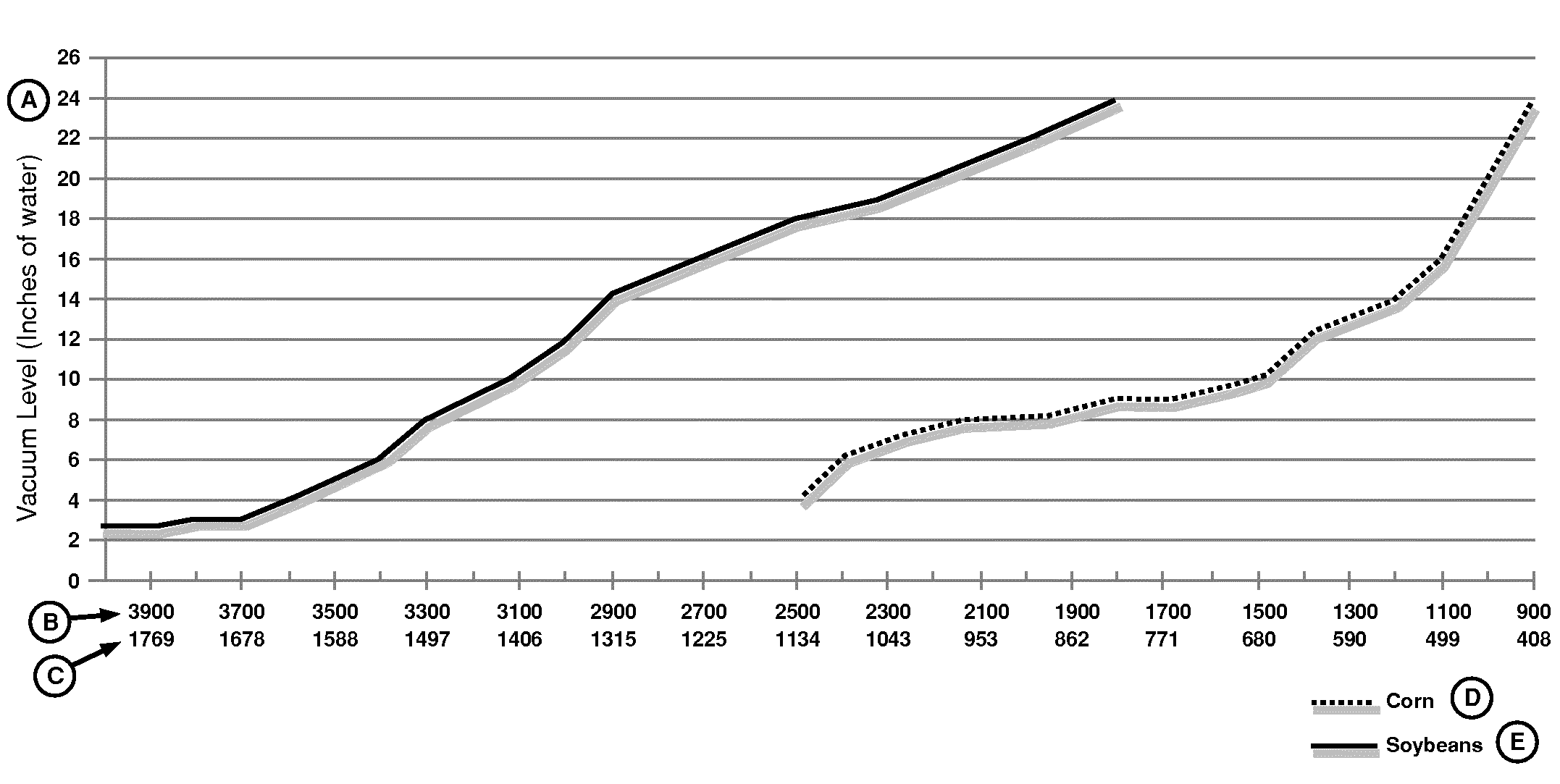
A84082-UN-28OCT14
A - Vacuum Level In Inches Of Water
B - Seeds Per Pound
C - Seeds Per Kilogram
D - Corn
E - Soybeans
NOTE: The vacuum level is slightly lower during tractor and vacuum motor start-up.
Set vacuum level as follows:
-
Refer to tractor OM: Move SCV lever to forward detent position to start vacuum motor. Let oil warm up for 15 minutes.
-
Fill hoppers or CCS bulk tanks with seed.
-
With machine in raised position and stationary, use Fill function on display to fill seed bowls.
-
To adjust vacuum level, adjust flow control valve on planter or SCV control in tractor.
|
SeedStar is a trademark of Deere & Company |
WP29706,000079D-19-20141029 |