Setting CCS Tank Pressure
 CAUTION: Do not operate CCS blower without tank lids installed.
Harmful chemicals are blown into face and seed lines plug.
CAUTION: Do not operate CCS blower without tank lids installed.
Harmful chemicals are blown into face and seed lines plug.
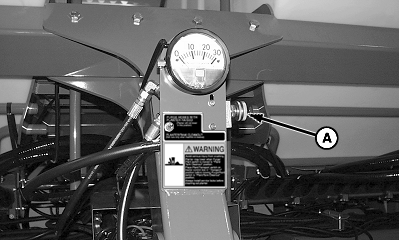
A54384-UN-28MAY04
A - Flow Control Valve Handle
To set the tank pressure proceed as follows:-
Make sure that tank lids are closed.
-
IMPORTANT: Warm oil by running vacuum blowers (if equipped) or install a hose loop in SCV per tractor operator's manual. DO NOT use CCS fan to warm oil or seed delivery hoses plug.
Warm oil for 15 minutes before setting pressure.
-
Lower machine, leave SCV in constant retract detent position.
-
Open CCS fan flow control valve handle (A) (counterclockwise) until seed starts flowing to row hoppers.
-
IMPORTANT: DO NOT exceed 24 in. of tank pressure or damage occurs to the hydraulic motor and seed tank lids.
NOTE: If low warnings are received while planting and row meters are empty, increase tank pressure by two inches until meters stay full.
When hoppers are full and machine is not moving, adjust pressure according to crop being planted. See CCS Tank Pressure Settings table below.
|
Product |
Pressure in Inches of Water |
Nozzle Insert |
Small Seed Discharge Elbow (Vacuum Only) |
|||
|---|---|---|---|---|---|---|
|
12/16 Row |
24 Row |
12/16 Row |
24 Row |
12/16 Row |
24 Row |
|
|
Soybeans |
12 |
14 |
NO |
NO |
NO |
NO |
|
Small Corn Over 4400 seeds/kg (2000 seeds/lb.) |
10 |
12 |
NO |
NO |
NO |
NO |
|
Medium Corn From 4400 through 2640 seeds/kg (2000 and 1200 seeds/lb.) |
12 |
14 |
NO |
NO |
NO |
NO |
|
Large Corn Less than 2640 seeds/kg (1200 seeds/lb.) |
14 |
16 |
NO |
NO |
NO |
NO |
|
WP29706,00007E5-19-20140909 |