Ride Dynamics

A59325-UN-19FEB07
Menu

A59551-UN-08MAR07
Planter Button
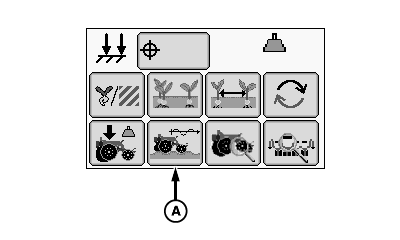
A67118-UN-12MAY10
Ride Dynamics Button
A - Ride Dynamics Button
Ride Dynamics
Select Menu >> Planter button >> Ride Dynamics button.
When ride dynamics button (A) is selected the ride dynamics at a glance screen is displayed.
The ride dynamics run screen displays row unit ride quality information for each row unit equipped with a sensor node controller. An accelerometer in each sensor node measures the severity of row unit movements.
Row Unit ride information is displayed as a percentage. 100% good ride represents optimum row unit ride quality and 0% represents the poorest ride quality. The Ride Quality at a Glance bars decrease in height as row unit ride gets worse.
Excessive row unit movement and bounce can affect meter performance, in-row seed spacing, and seed depth consistency.
To improve ride quality, reduce ground speed or increase row unit down force.
The ride quality alarm set point can be set on the Alarms and Limits Setup Page. Default value is 90 percent.
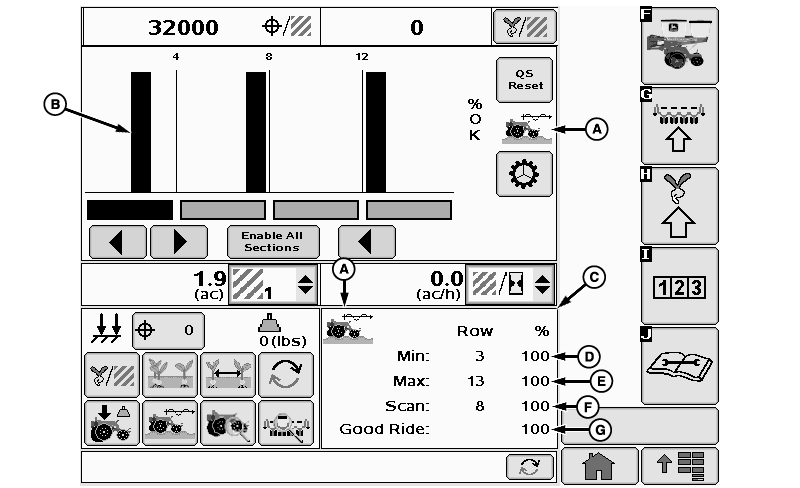
A67885-UN-28JUN10
A - Ride Dynamics Icon
B - Percent Good Ride Graph
C - Ride Dynamic Details Screen
D - Minimum Row Good Ride
E - Maximum Row Good Ride
F - Scan Row Good Ride
G - Planter Average Good Ride
Ride Dynamics at a Glance Screen
(A) Ride dynamics icon
(B) Percent good ride graph
(C) Ride dynamic details screen contains the information of the current bar graph.
(D) Minimum row good ride
(E) Maximum row good ride
(F) Scan row good ride
(G) Planter average good ride
Screen Area Information
QS Reset - QS Reset
Enable All Sections - Enable All Sections
Row - Row
|
OUO6064,0000194-19-20100720 |