Seed Singulation

A59325-UN-19FEB07
Menu

A59551-UN-08MAR07
Planter Button
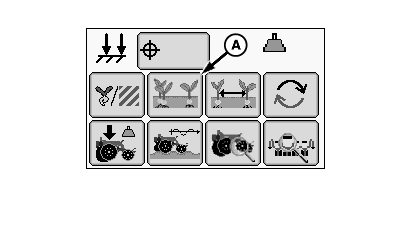
A67121-UN-12MAY10
Seed Singulation Button
A - Seed Singulation Button
Select Menu >> Planter button.
When seed singulation button (A) is selected the seed singulation at a glance screen is displayed.
NOTE: Since singulation measurements are taken at the seed sensor, the appearance of the emerged crop may not be the same as the information displayed on the monitor. For example, seed roll and bounce in the furrow due to excessive ground speed can make emerged seed spacing appear worse than what the monitor indicated.
The Seed Singulation run screen provides the operator with information about the performance of each seed meter. The Planter Main 1 (PM1) controller measures the timing of the counts from the seed sensors at each row to determine whether they indicate a skip, multiple, or acceptable spacing, and displays the information on the GreenStar™ Display.
The center line of the Singulation at a Glance graph represents perfect singulation (zero skips and zero multiples). Singulation at a Glance bars above the center line indicate an increasing percentage of doubles. Singulation at a Glance bars below the center line indicate an increasing percentage of skips. Bars may appear both above and below the center line when an improperly adjusted meter has doubles and skips.
To improve meter singulation performance, choose the correct seed disk for the crop being planted, adjust vacuum level, adjust double eliminator setting (if used), and use the correct amount of talc. Refer to your Rate Charts and Settings Manual for meter adjustments and recommendations.
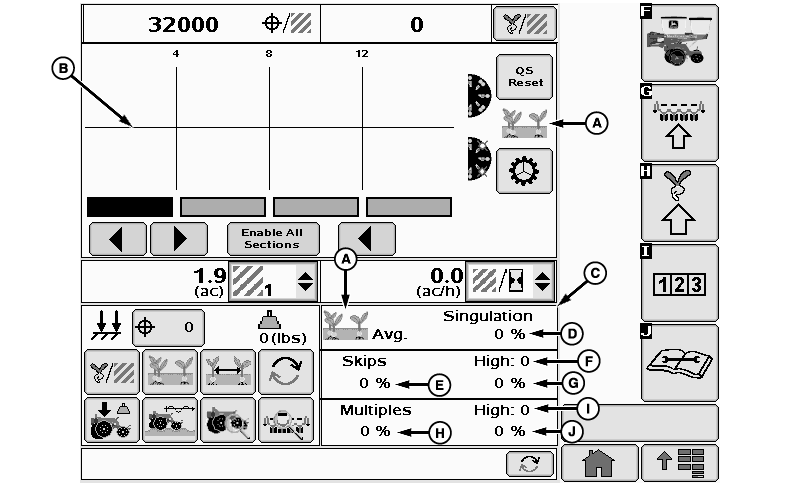
A67888-UN-28JUN10
A - Seed Singulation Icon
B - Percent Multiples and Skips Graph
C - Seed Singulation Details Screen
D - Planter Average Singulation Percentage
E - Planter Average Percent Skips
F - Row With Highest Skips
G - High Row Skip Percentage
H - Planter Average Percent Multiples
I - Row With Highest Multiples
J - High Row Multiple Percentage
Seed Singulation at a Glance Screen
(A) Seed singulation icon
(B) Percent multiples and skips graph
(C) Seed singulation details screen contains the information of the current bar graph.
(D) Planter average singulation percentage
(E) Planter average percent skips
(F) Row with highest skips.
(G) High row skip percentage
(H) Planter average percent multiples.
(I) Row with highest multiples.
(J) High row multiple percentage
Screen Area Information
QS Reset - QS Reset
Enable All Sections - Enable All Sections
Avg. - Average
|
OUO6064,0000197-19-20100729 |