Row Clutches Self Test

A59325-UN-19FEB07
Menu

A59551-UN-08MAR07
Planter Button

A59567-UN-08MAR07
Diagnostic Softkey
Use this to identify the operational row clutches detected by the monitor.-
Select Menu >> Planter button >> Diagnostics softkey >> Tests tab.
-
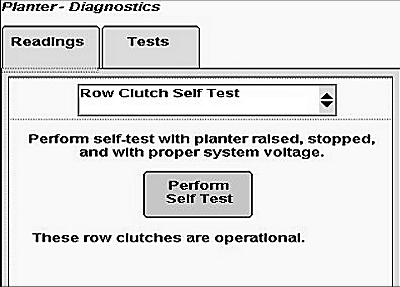
Select Row Clutches Self Test from drop down box to see status of each row clutch.
-
Select perform self test button and system will perform a self test on row clutches.
Screen Area Information
Planter Diagnostics - Planter Diagnostics
Tests - Tests
Row Clutches Self Test - Row Clutches Self Test
Perform Self Test - Perform Self Test
NOTE:
A63777-UN-10NOV08
Row Clutch Diagnostic Self-test During Diagnostics.
Perform self-test with planter raised over height set point, stopped, and with proper system voltage.
After pressing self-test button, screen displays “These row clutches are operational”, followed by a list.
|
OUO6064,0000217-19-20100721 |