Setting Single Set-Point Target Down Force
A72548-UN-15SEP11
A72549-UN-15SEP11
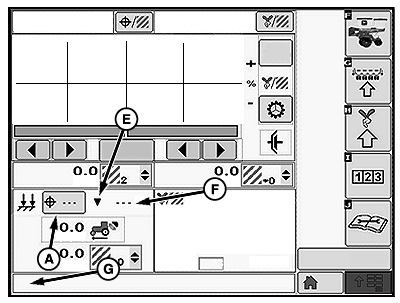
A - Down Force Target Button
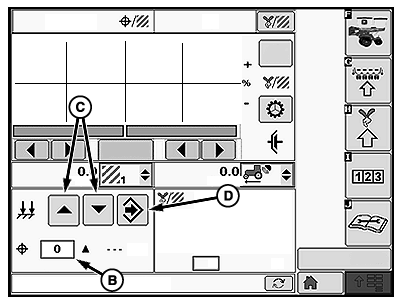
B - Target Down Force Input Box
C - Increase and Decrease Arrows
D - Enter
E - Indicator Arrows
F - Actual Down Force
G - Warning Message Area
Setting Target Down ForceSelect the down force target button (A) to open the target down force input screen.
Set target row unit down force by using the target down force input box (B) or the increase or decrease arrows (C).
When complete select enter (D).
Indicator arrows (E) are displayed as a visual indication that the system is increasing or decreasing pneumatic down force pressure.
Actual down force (F) is checked on a timed interval and automatically adjusted if necessary to match the target down force. If Actual down force (F) deviates below the target at an unacceptable rate, a warning appears in the warning message area (G) stating "Check pneumatic down force for leaks". Depending on the severity of the leak, the actual down force number (F) is highlighted orange or red.
|
OUO6064,00005C7-19-20111110 |