Alarms and Limits Setup Page
The Alarms and Limits Setup Screen allows the operator to adjust the levels at which cautions and alarms occur for each of the SeedStar™ XP monitor features.
For Set-Point Pneumatic Down Force controlled machines Target Margin must be set and adjusted from this screen.
If any of the monitored values go beyond the alarm set point, the bar graph and background of the numerical display changes to red.
Enter “0” in any of the alarm set point boxes to disable the alarm for that function.
-

A59325-UN-19FEB07Menu

A59551-UN-08MAR07Planter Button
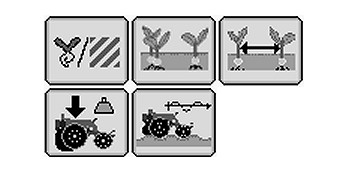
A67768-UN-16JUN10SeedStar XP Monitor Buttons
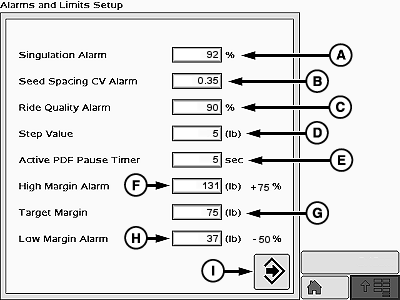
A73149-UN-19OCT11A - Singulation Alarm
B - Spacing CV Alarm
C - Ride Quality Alarm
D - Step Value
E - Active PDF Pause Timer
F - High Margin Alarm
G - Target Margin
H - Low Margin Alarm
I - Enter
Select Menu >> Planter button. -
Select and hold any SeedStar™ XP Monitor button for 4 seconds.
-
Select Singulation Alarm Box (A) to enter the minimum acceptable singulation percentage. Default singulation alarm setting is 92 percent.
-
Select Spacing CV Alarm Box (B) to enter the minimum acceptable coefficient of variation value. Default spacing alarm setting is 0.35.
-
Select Ride Quality Alarm Box (C) to enter the minimum acceptable ride quality percentage. Default ride quality alarm setting is 90 percent.
-
Select Step Value Box (D) to enter the incremental value the down force changes when the increase or decrease arrows are used to adjust the pneumatic down force. Increments can be set between 1 and 50.
-
NOTE: Active PDF pause timer box is only available for Active Pneumatic Down Force controlled machines.
Select Active PDF Pause Timer Box (I) to set the amount of time that the Active PDF system is inactive when the Pause button is depressed on the main run screen.
-
Select High Margin Alarm Box (F) to enter the high range for row unit down force margin. Default margin alarm setting is 75 percent above the target margin.
-
Select Target Margin Box (G) to set and adjust target margin from this screen. If equipped with Active Pneumatic Down Force, target margin can also be set on the run page.
-
Select Low Margin Alarm Box (H) to enter the low range for row unit down force margin. Default margin alarm setting is 50 percent below the target margin.
-
When complete select Enter (I).
Screen Area Information
Planter Configuration - Planter Configuration
Alarms and Limit Setup - Alarms and Limit Setup
|
OUO6064,00005D3-19-20111110 |