Row Details

A59325-UN-19FEB07
Menu

A59551-UN-08MAR07
Planter Button
A67004-UN-30APR10
Row Details Button
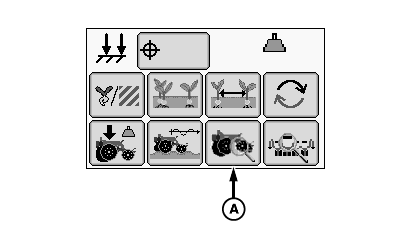
A - Row Details Button
Select Menu >> Planter button.
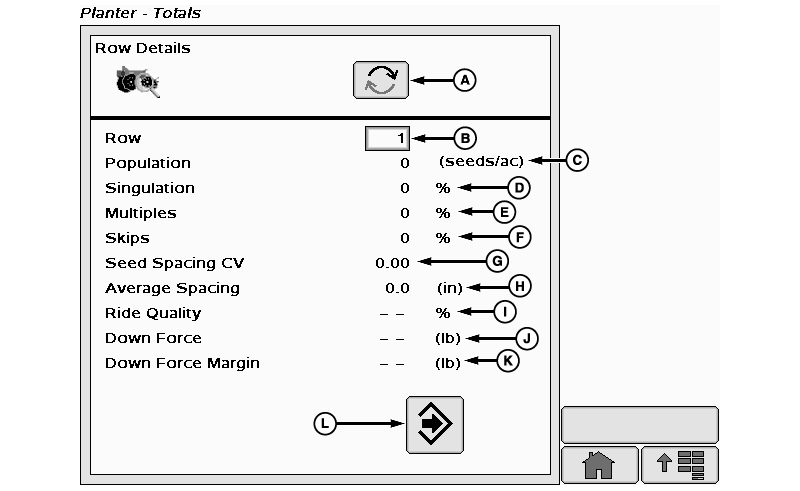
When row details page button (A) is selected the row detail page is displayed.
A67801-UN-02JUL10
A - Row Advance Button
B - Row Selection Input Box
C - Population Field
D - Singulation Field
E - Multiples Field
F - Skips Field
G - Seed Spacing Coefficient of Variation
H - Average Spacing Field
I - Ride Quality
J - Down Force Field
K - Down Force Margin Field
L - Return to Main Button
This screen displays active planting data on a per row basis and allows the operator to compare the operation of one row to another.
(A) Row advance button changes row details column to the next row in sequence.
(B) Row selection input box allows operator to input row number to view.
(C) Population field displays seed per area.
(D) Singulation percentage
(E) Multiples percentage
(F) Skips percentage
(G) Seed spacing Coefficient of Variation (CV)
(H) Average spacing
(I) Ride Quality
(J) Down force
(K) Down force margin
(L) Return to main button changes screen back to previous view.
Screen Area Information
Planter - Totals - Planter - Totals
Row Details - Row Details
Row - Row
Population - Population
Singulation - Singulation
Multiples - Multiples
Skips - Skips
Seed Spacing CV - Seed Spacing CV
Average Spacing - Average Spacing
Ride Quality - Ride Quality
Down Force - Down Force
Down Force Margin - Down Force Margin
|
OUO6064,00005F0-19-20111110 |